
My DGX Spark Said “Out of Memory.” I Took That Personally.
“One more model won't hurt.”
That sentence has probably caused more home-lab incidents than expired certificates, broken Docker volumes, and mysterious YAML indentation combined.
It certainly caused mine.
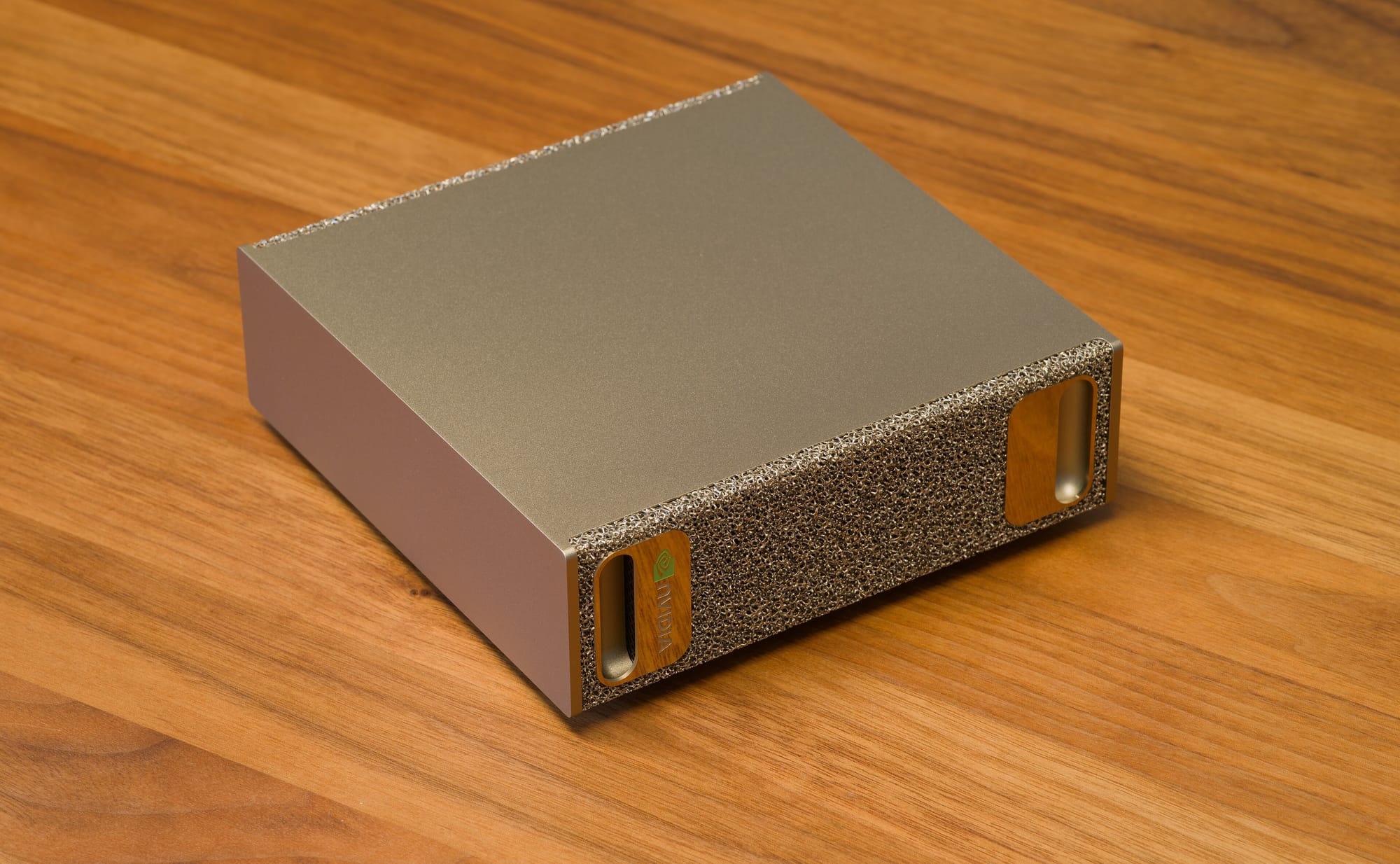
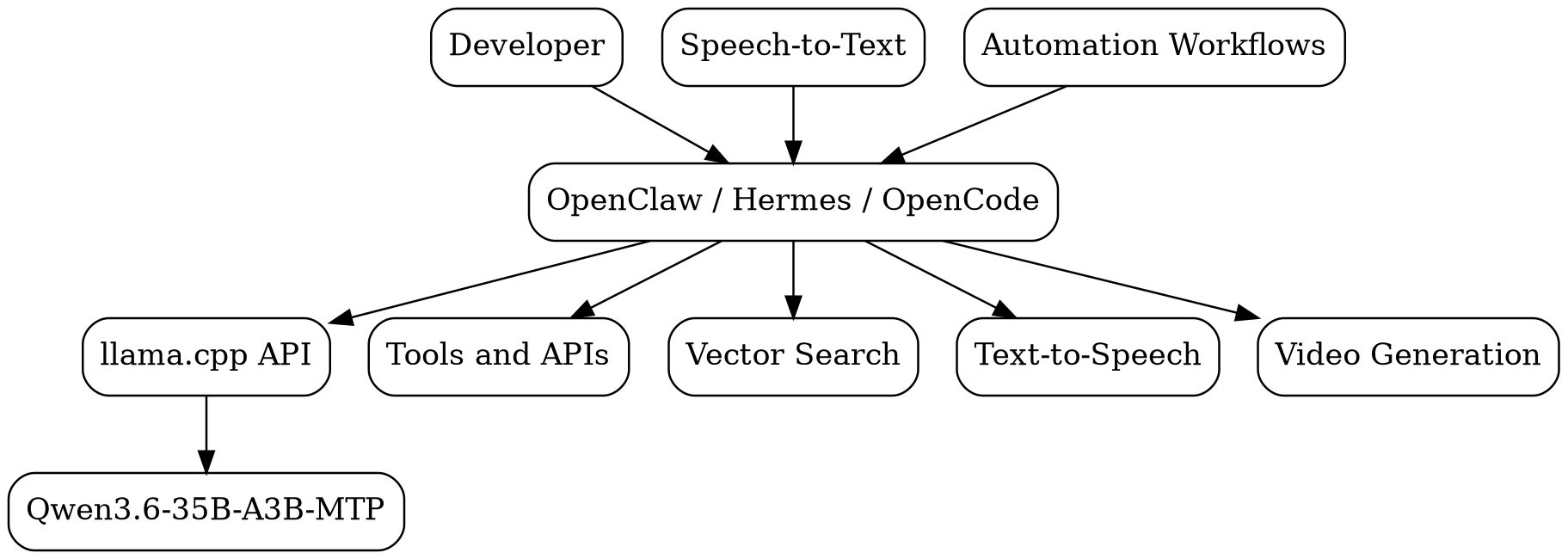
My NVIDIA DGX Spark was already busy. It was running chat models, an embedding service, speech-to-text, text-to-speech, vector search, automation workflows, and all the supporting infrastructure needed to keep those alive. It was not an empty benchmarking machine sitting around waiting to impress people. It was my daily AI workstation — a coworker that never takes vacation but occasionally demands another 30 GB of unified memory.
Then Qwen3.6 arrived.
Naturally, I looked at the remaining memory, looked at the model, ignored every obvious warning sign, and decided there was probably room for one more.
There was not.
At least, not at first. This is the story of getting Qwen3.6-35B-A3B-MTP — at Q6, with a 192K context window — to become the primary brain of the workstation while everything else kept running around it. It involved weeks of compiling, crashing, rebooting, measuring, and confidently blaming the wrong software. The machine hard-locked more than once. This article explains both the victory and the wreckage.
If you read How I Turned My HomeLab into JARVIS, you already met the ears, the voice, and the memory — Whisper, Qwen3-TTS, embeddings, and an agent named Hermes doing a passable impression of a butler. At the end of that post I promised the large reasoning model deserved its own article, once I finished negotiating memory-custody arrangements between all the services. This is that article. JARVIS could already listen and speak; this is the story of finally giving it a brain without the rest of the workstation collapsing under the weight.
Here is where it eventually landed, for the impatient:
| Workload | Observed performance |
|---|---|
| Prompt ingestion | ~1,000 tokens/second |
| Normal generation | ~70 tokens/second |
| Generation near 186K context | ~50 tokens/second |
Those are numbers from my workstation and my workload, not universal promises. The benchmark, honestly, is just the receipt. The real story is building a practical personal AI workstation that doesn't fall over when you look at it wrong.
Lesson zero: “It fits in memory” and “it can live comfortably on the workstation” are two completely different requirements.
The 128 GB Number Is Not Your Budget
The DGX Spark looks suspiciously small for something marketed as a personal AI supercomputer. Inside is the NVIDIA GB10 Grace Blackwell Superchip — an Arm Grace CPU fused to a Blackwell GPU with 128 GB of coherent unified memory. The spec that changes everything is not the core count. It is that memory architecture.
A traditional workstation has two memory pools: system RAM for the CPU and VRAM for the GPU. A 24 GB GPU cannot hold a 31 GB model, no matter how much system RAM you install. The boundary is part of the design.
The Spark erases that boundary. Grace and Blackwell share one pool. The OS, containers, model weights, KV caches, databases, and that tiny utility container you forgot about six months ago all draw from the same 128 GB. That is tremendous flexibility. It also means every workload on the machine is now fighting over the same refrigerator.
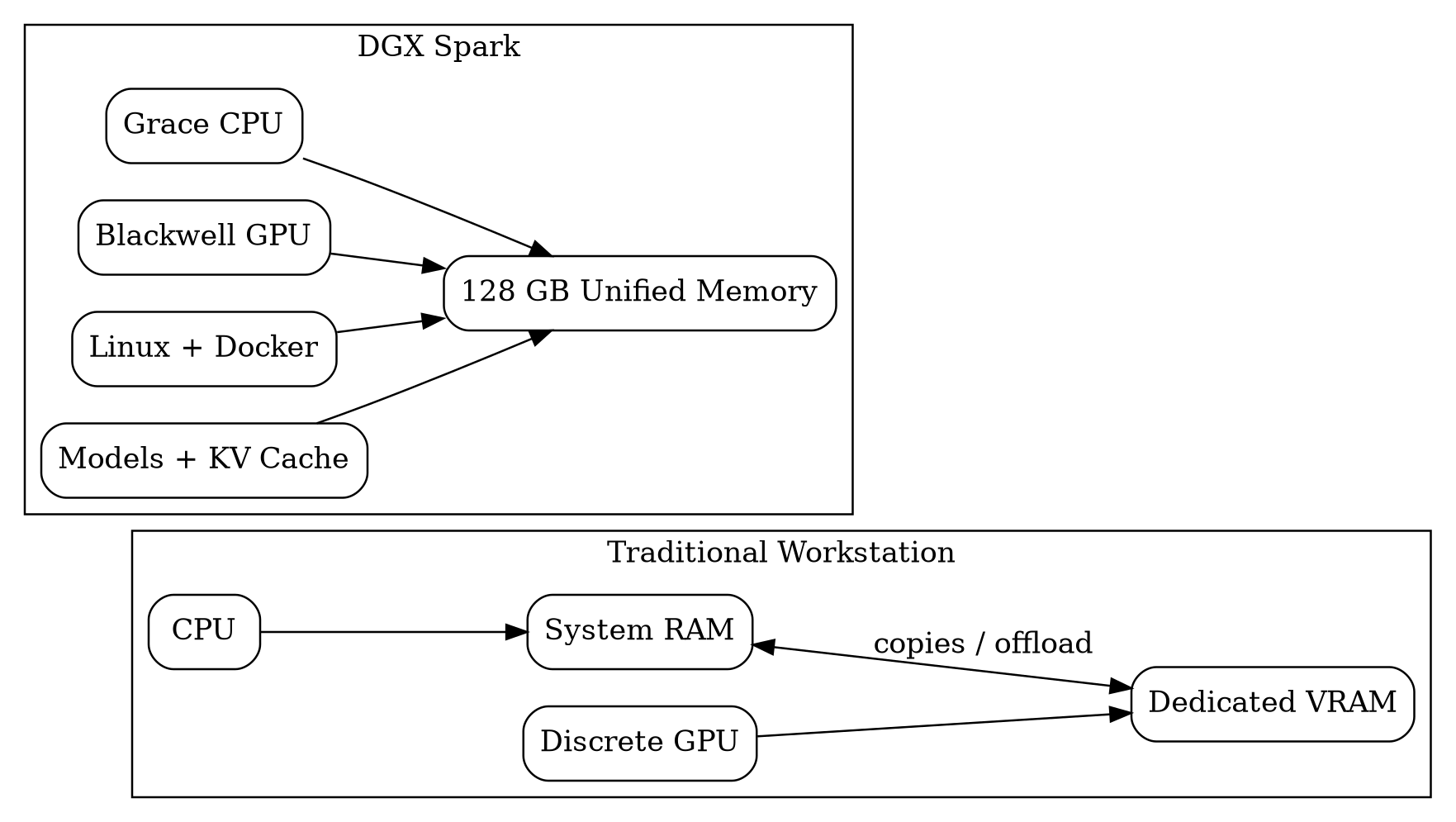
And here is the trap: the box says 128 GB, but that is not your model's budget. After the OS, desktop, Docker, file caches, and every supporting AI service take their cut, the number I actually saw was closer to 122 GB — with a meaningful chunk already gone before the main model loaded.
A model file tells you the ticket price. It does not tell you the cost of the entire vacation. A 31 GB GGUF also wants runtime buffers, compute graphs, CUDA allocations, KV cache, prompt cache, context checkpoints, parallel request slots, and server overhead. On a conventional system the question is “will the model fit in VRAM?” On the Spark the honest question is “will the whole workstation still be healthy after the model, context, caches, and every other service are loaded?”
Engineering note: Unified memory is not magical unlimited VRAM. It is a shared-resource architecture. The benefit is flexibility. The cost is that every service becomes part of GPU capacity planning.
Why Qwen, and Why Q6 Instead of Chasing Q4
People ask why almost everything on my Spark is a Qwen model. The short answer is that they work for my workflows. The useful answer is consistency.
I have run Llama, DeepSeek, Gemma, Mistral, Phi, Mixtral, and a pile of others. The problem was never capability — it was constantly changing behavior. One model needed a specific tool template. Another needed different sampling. Another coded brilliantly but produced structured output like it was allergic to schemas. Eventually I was spending more time managing model personalities than solving problems. Standardizing on Qwen turned “hiring random freelancers” into “working with specialists from the same engineering org.” Prompting patterns transfer, tool calling is strong, coding is dependable, and I stopped storing seven incompatible prompt formats in my own head — which, it turns out, is also a memory budget.
Then came the quantization fight. Quantization discussions have a habit of becoming religious arguments. Q4 believers insist the quality difference is negligible. Q8 believers consider anything lower to be intellectual vandalism. Someone always posts a screenshot with twelve decimal places. Meanwhile I am just trying to generate a correct C# service and get back to work.
My workload is heavily structured: C# services, SQL, APIs, Mermaid diagrams, architecture docs, nested tool-call JSON, multi-step refactors. At Q4 the answers were rarely wrong — they were subtly off. A tool call needing a correction. A diagram with a syntax hiccup. A method missing an edge case. An architecture doc quietly drifting from one of its own constraints. Each issue tiny. The friction accumulated. The question was never “can Q4 answer the prompt?” It was “how often does Q4 make me repair the answer?”
This is why I treat first-pass quality as a performance metric. Picture two models: Model A generates at 100 tokens/second but produces invalid JSON 15% of the time; Model B generates at 70 tokens/second and usually works on the first try. The benchmark says Model A is faster. My calendar says Model B is faster. A completed task is the unit that matters, not a generated token.
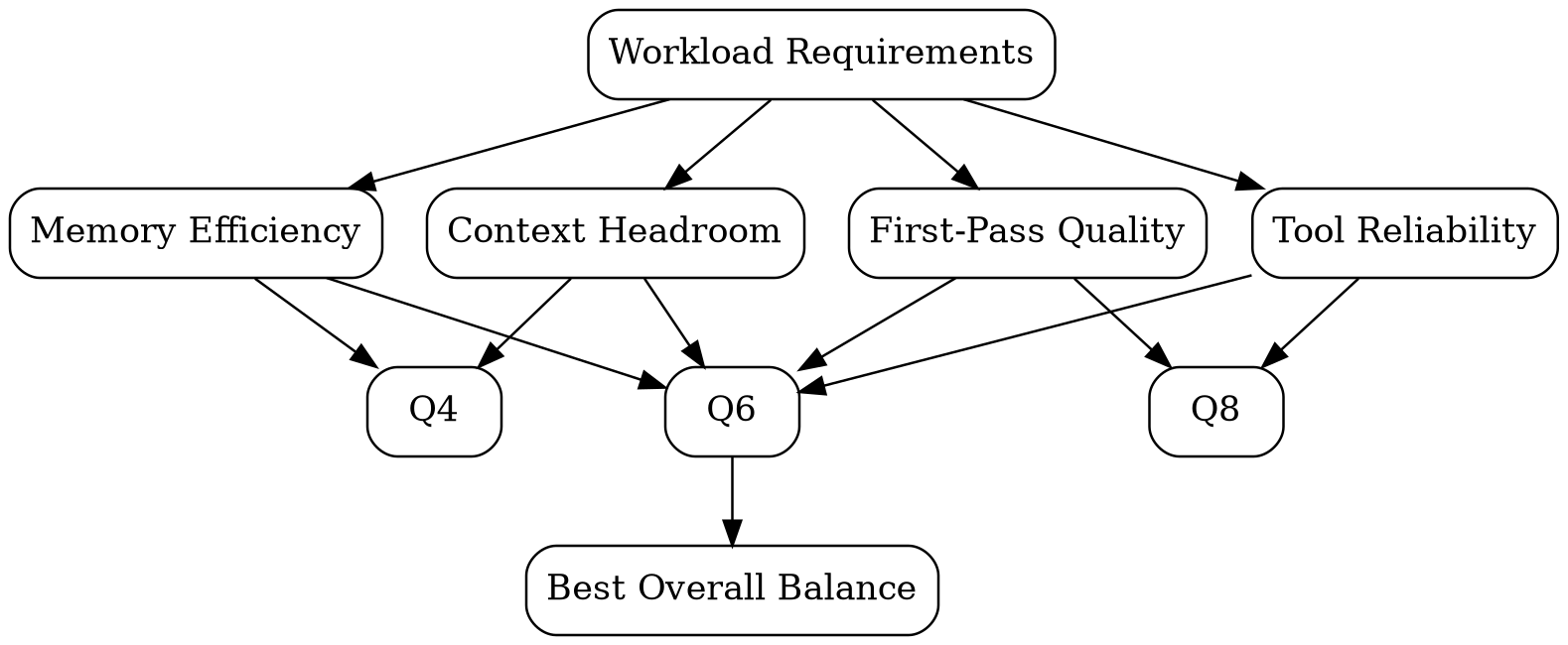
The UD-Q6_K_XL build landed at roughly 31 GB. That is a serious allocation on a machine already running a stack of services, but it bought more consistent tool calling, cleaner structured output, better first-pass code, and — the thing you cannot benchmark — trust. When you trust a model's output, you delegate bigger tasks to it, hand it larger contexts, and let it touch tools. A few extra gigabytes bought confidence, and confidence is leverage. Could I save memory with Q4? Absolutely. Would I save time across a week? For my workload, no.
Building llama.cpp, Because I Enjoy Suffering Productively
Installing software on Linux usually goes: sudo apt install thing, the computer installs the thing, everyone is happy. Compiling llama.cpp for a brand-new NVIDIA architecture was not quite that experience. New hardware tends to arrive before every prebuilt binary and container has learned how to behave around it. My two options were to wait for someone else to produce the exact build I wanted, or compile it myself and discover several exciting new ways to be wrong. Naturally, I chose option two.
Why llama.cpp over LM Studio or vLLM? Excellent GGUF support, fine-grained memory control, flexible KV-cache quantization, prompt caching, speculative decoding, easy benchmarking, a lightweight OpenAI-compatible server, fast support for new community quantizations — and enough command-line switches to make an aircraft cockpit feel under-configured. That last one is both a feature and a warning.
The build itself, once the dependencies were in place:
cmake -S . -B build \
  -DGGML_CUDA=ON \
  -DCMAKE_BUILD_TYPE=Release \
  -DLLAMA_CURL=ON \
  -DCMAKE_CUDA_ARCHITECTURES=native

cmake --build build --config Release -j8
Two things I learned the hard way, so you don't have to. First, nvidia-smi working does not mean nvcc --version works — the driver and the CUDA toolkit are related but not the same component, and CMake needs the compiler, not the driver. Second, I skipped the “test with a small model first” step and went straight for the large model I actually cared about, which turned a simple build-validation problem into a simultaneous model-format, memory, context, and CUDA investigation. This is the engineering equivalent of testing a new bridge by driving a fully loaded fuel truck across it.
Lesson learned: Validate the inference engine before debugging the model. Change one variable at a time, unless you enjoy debugging several unrelated failures at once.
The Command That Took Weeks to Build
At first the command was simple: llama-server -m model.gguf. Then I wanted GPU acceleration. Then a bigger context. Then better KV-cache efficiency. Then prompt caching. Then speculative generation. Then multiple slots. Then OpenAI compatibility. Then a stable chat template. Then enough monitoring to understand why the machine had become unresponsive. Eventually the command looked less like a server launch and more like a confession.

Here is roughly where it settled:
./build/bin/llama-server \
  --model /models/Qwen3.6-35B-A3B-UD-Q6_K_XL.gguf \
  --host 0.0.0.0 \
  --port 8080 \
  --ctx-size 98304 \
  --n-gpu-layers 999 \
  --flash-attn on \
  --cache-type-k q8_0 \
  --cache-type-v q8_0 \
  --batch-size 2048 \
  --ubatch-size 512 \
  --threads 16 \
  --threads-batch 16 \
  --parallel 1 \
  --cont-batching \
  --metrics
A launch command is a set of architectural decisions written on one line. The important ones:
- `--ctx-size` was the most expensive decision of the bunch. Model weights are mostly fixed; the KV cache grows with context, so context is the flexible — and dangerous — part of the memory equation. The best context size is not the largest number the server accepts. It is the largest number your workload can actually use without destroying stability. I keep profiles: 16K for baseline, 32K for daily work, 64K for big coding/architecture sessions, 96K only when I genuinely need long-running agent context.
- `--cache-type-k q8_0` / `--cache-type-v q8_0` quantize the KV cache — separate from the model quantization. The model can be Q6 while the cache is Q8. At 16K this barely matters; at 96K it decides whether the rest of the workstation survives.
- `--flash-attn on` reduces attention-memory traffic. Usually a clear win — but “supported in principle” and “behaves correctly with this exact model, CUDA version, and build” are not the same sentence, so validate it.
- `--parallel 1` looks stingy and is completely intentional. Each slot carries its own context and cache assumptions. A config that is comfortable with one slot can become impossible with four. Concurrency multiplies memory assumptions. For the primary long-context model, I want one reliable request, not several enormous simultaneous ones.
- `--host 0.0.0.0` makes it reachable on the LAN — convenient, and a reminder that “local AI” does not automatically mean “secure AI.” A local endpoint may have no auth, tool access, and repository access. Put a firewall, reverse proxy, or VPN in front of it.
The deeper lesson is that performance tuning is not finding the magic command. It is learning enough about the system that the command stops being magic. And whatever you do, never keep an important launch command only in your shell history — put it in version control, comment it, parameterize it, and record the build it was tested against.
The Client Also Had Opinions (and a Temperature)
This one took me an embarrassingly long time to notice: my carefully chosen sampling settings were being politely ignored.
I had tuned the server for deterministic, structured work — low temperature, because I want a Docker Compose file, not a jazz solo. But an OpenAI-compatible endpoint has a quiet rule: whatever the client puts in the request body wins. And my clients — OpenClaw, OpenCode, an IDE plugin, an n8n node — each had opinions. Every one of them cheerfully attached its own temperature, top_p, and assorted friends to every request, overriding the server like a customer who marches straight past the menu to explain to the chef how the kitchen should be run.
The client behaves like that one relative who “just knows what's best.” You set temperature to 0.2. The client leans in and says “no, sweetie, 0.9 is better for you,” and takes it up directly with the sampler. You were not consulted. You were merely the prompt.
The symptom was memorable. I asked for a simple Docker Compose file. At the client's creative-writing temperature, the model did not produce YAML. It produced a meditation. It reasoned, at length, about what a Docker Compose file fundamentally is — the philosophical nature of a service, the ephemerality of a container, whether a volume truly persists or merely defers its own impermanence. It was genuinely beautiful. It was also completely useless. I asked for services: and I got Kierkegaard.
This is the whole reason structured tasks — YAML, JSON, tool calls, SQL — want a low, boring temperature. Turn the creativity up and the model starts treating “generate a config file” as an invitation to explore its feelings about configuration. Turn it down and it just hands you the config file, which was, at all times, the entire point.
The fix was to stop assuming and start looking. --verbose on the server prints the sampling parameters actually used per request, which is exactly how I caught the override red-handed. From there it was simple: pin the temperature at the layer that actually wins — the client — instead of the layer I merely wished would win. Every integration got its sampling set explicitly, so the compose file now arrives as a compose file, and the existential philosophy stays in the group chat where it belongs.
Lesson learned: On an OpenAI-compatible endpoint, the request body is the boss. If the client sends its own temperature, your server default is a suggestion it will nod at politely and then completely ignore.
Benchmarks: Fast Enough to Become Boring
After weeks of compiling, tuning, restarting, crashing, and staring suspiciously at memory graphs, I reached the part everyone asks about: how fast is it? The most repeatable answer was about 70 generated tokens per second under the configurations I used most. I did not stop Docker, shut down the vector database, or disable the services that make the workstation useful. These numbers describe the machine I actually use, not one prepped for a beauty pageant.
| Scenario | Context | Prompt processing | Generation | Peak unified memory |
|---|---|---|---|---|
| Cold start baseline | 16K | 980 tok/s | 72.4 tok/s | 58.2 GB |
| Reused prompt prefix | 16K | 1,640 tok/s | 72.8 tok/s | 60.1 GB |
| Coding session | 32K | 905 tok/s | 70.9 tok/s | 67.4 GB |
| Architecture session | 64K | 790 tok/s | 68.6 tok/s | 82.7 GB |
| Long agent session | 96K | 690 tok/s | 65.1 tok/s | 99.8 GB |
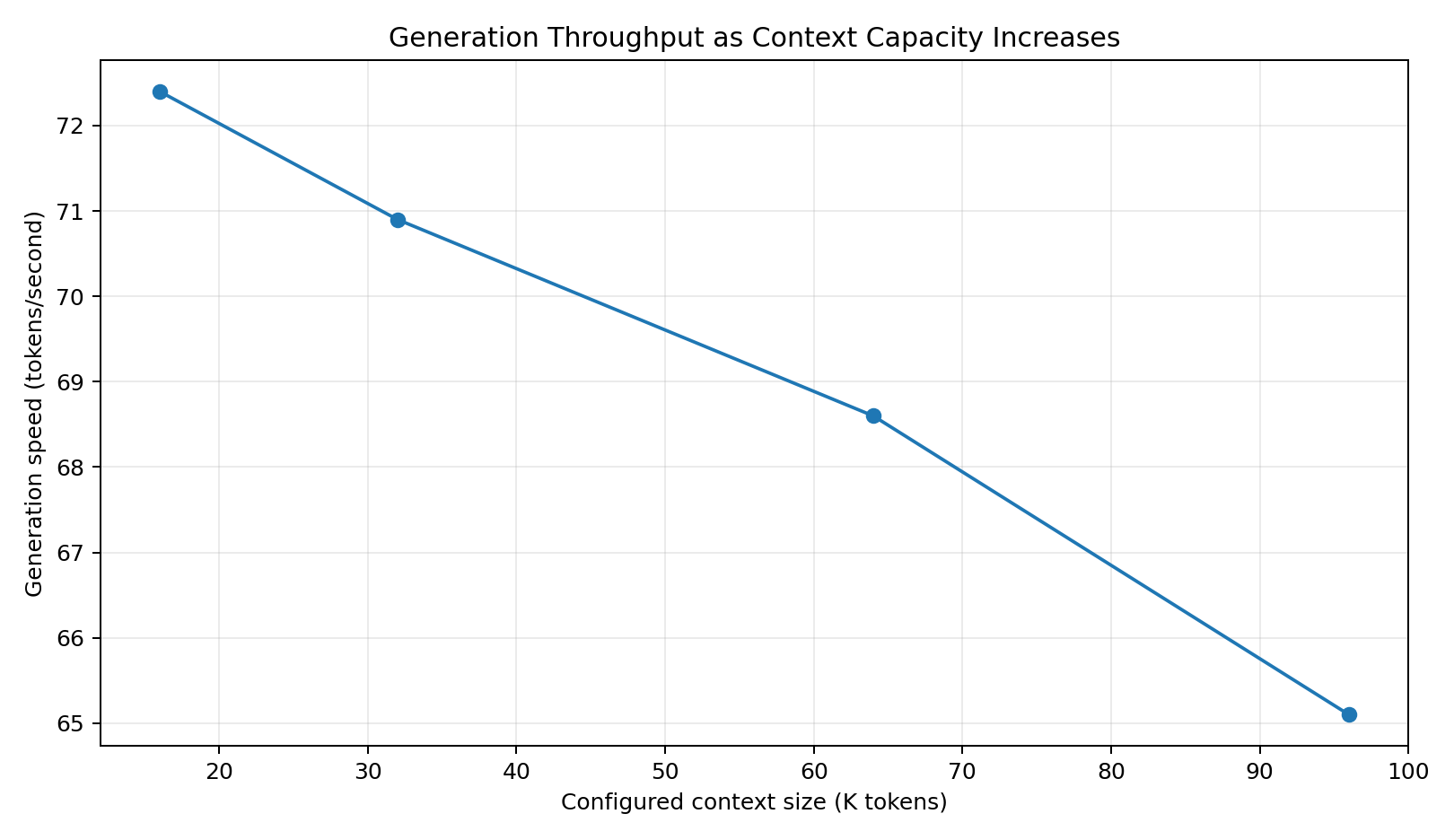
A few things worth pulling out. Prompt processing matters more than the headline generation number for agentic work, because every tool result becomes new prompt content. Generation speed gets the glory; prompt processing determines how long the pauses feel between an agent's decisions. Reusing a stable prompt prefix — system instructions, tool definitions, coding conventions, response schemas — jumped processing from ~980 to ~1,640 tokens/second. That is not faster generation; it is less waiting before generation begins, which is often the more valuable kind of fast.
The memory column is why I never just cranked context to maximum and forgot about it. The 96K config approached 100 GB. That still fits in 128 GB — but “fits” is not “safe” when Linux, Docker, vector search, speech services, monitoring, file cache, and the occasional video-generation job that arrives like an uninvited marching band all still need room.
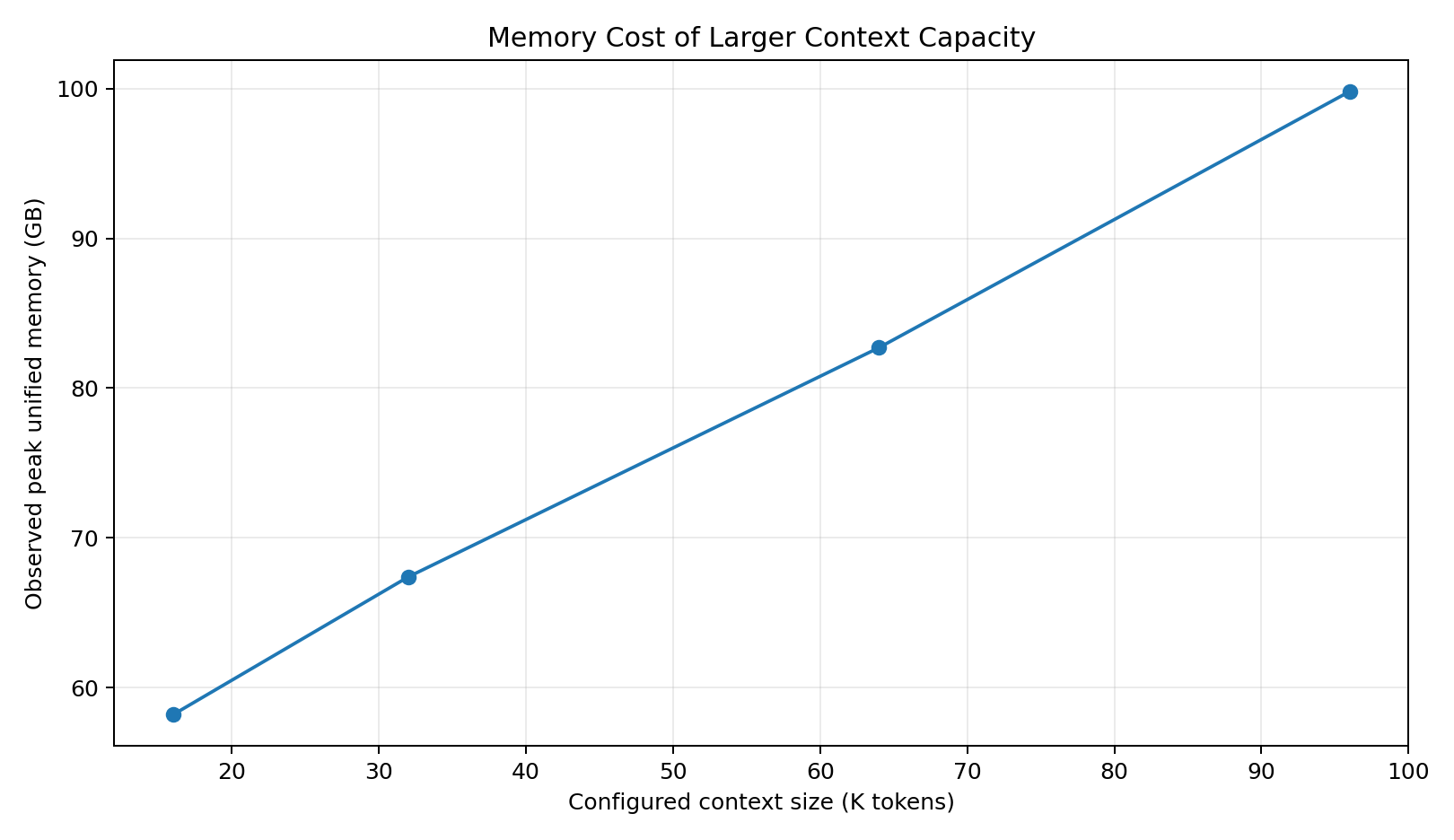
At ~70 tokens/second, generation stopped being the bottleneck — my reading speed became the bottleneck. That is the point where local inference becomes genuinely comfortable, and “fast enough to become boring” is the highest compliment I can pay infrastructure. Boring infrastructure disappears into the workflow.
Lesson learned: Benchmark the system you intend to operate, not the screenshot you want to post. A benchmark without configuration context is just a number wearing a tie.
Things That Tried to Kill My Server
Once the model was producing ~70 tokens/second, I briefly believed the hard part was over. That was adorable. What the Spark could not do was ignore the fact that I had configured every feature as though memory were a motivational concept rather than a finite resource. A greatest-hits reel of the real failures:
- The context window was technically valid. The model advertises a huge context. The engine accepts it. The machine has 128 GB. Therefore it should work. This argument is logically clean and operationally terrible — a supported context size is not a safe context size. Context became a server profile, not a feature I left maxed out.
- Parallel slots multiplied the problem. Several apps use the server, so why not let them all generate at once? Because each slot brings context and cache assumptions, and large context times four slots is a memory bill that escalates fast. The server did not care that most clients were idle. It cared about the capacity I had promised it.
- Prompt caching kept the memory I expected to recover. Caching a stable prefix is wonderful for speed and quietly retains state you assumed vanished when the request ended. Then a video job starts, and the “finished” language-model session is still holding meaningful memory. Caching makes repeated work faster by keeping something. That something has a cost.
- Video generation arrived with a folding chair. A ComfyUI or LTX pipeline allocates huge temporary buffers at different phases, and the peak is often not at the start. So: LLM server starts fine, video workflow starts fine, both look healthy, a later decode stage requests more memory, and everything becomes deeply educational. I now sort workloads into always-on, primary-interactive, and burst — and burst is allowed to temporarily displace the primary model.
- The OOM killer chose violence. When Linux can't satisfy allocations, it terminates a process — not necessarily the one I emotionally blame. The client reports a friendly
Connection reset, which does not mean the network failed; it may mean the kernel removed the server from existence. Always checkdmesgbefore diagnosing the wrong problem. - A driver version broke the container plan. A newer vLLM container wanted a 590-series driver; the host had 580. Each piece was reasonable; together they were incompatible. A container ships CUDA user-space libraries but still depends on the host's driver — a fact that has humbled many people debugging a remote box they can't just walk over and reboot
- Remote desktop became the canary. The earliest sign of memory pressure wasn't the AI server — it was the desktop going sluggish, windows not repainting, the mouse moving in installments, while the model happily kept generating tokens. The AI looked healthy while the workstation became unusable for the human. If interactive access degrades, the config is too aggressive even if the benchmark looks great.
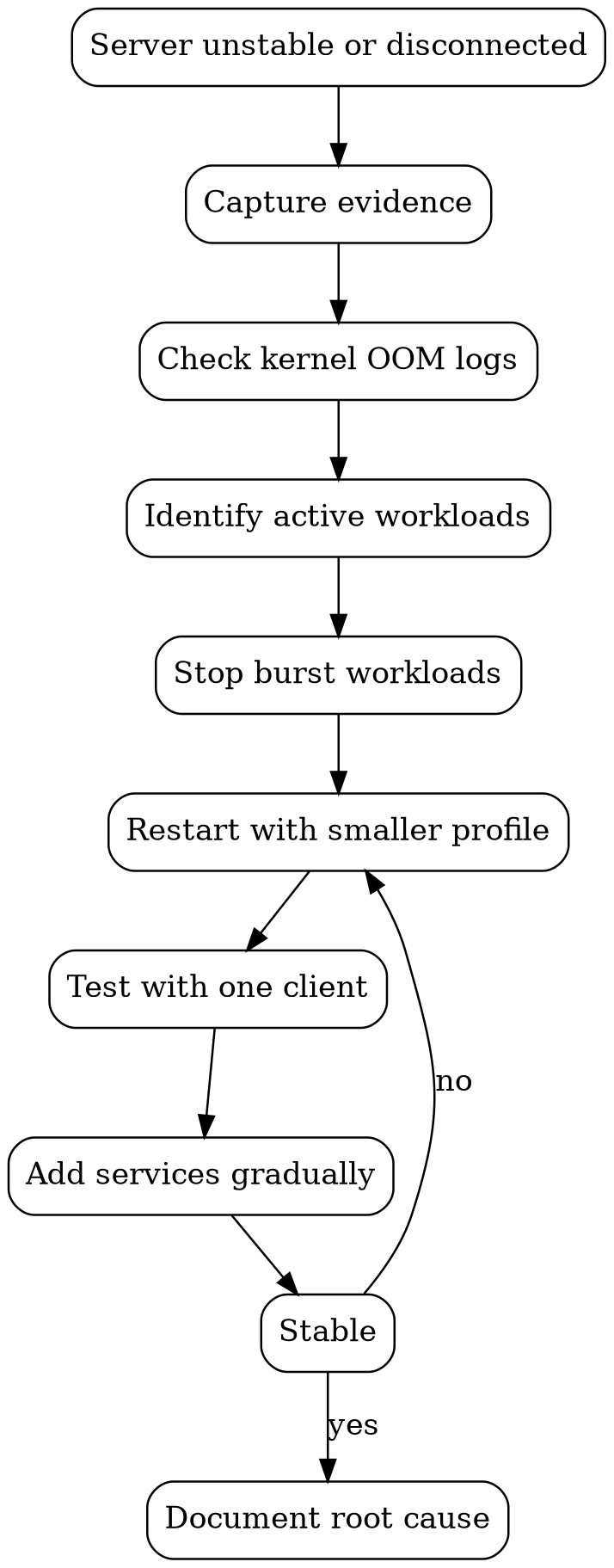
After enough of these, I stopped improvising and built a recovery checklist: preserve the evidence (free -h, nvidia-smi, top memory consumers), check the kernel log, check the service log, stop burst workloads first, restart the model with a smaller profile, reproduce with one client, then add workloads back gradually. That turns a chaotic recovery into a controlled experiment.
The Stability Ladder
I eventually organized everything into a stability ladder, and I do not promote a risky feature straight into daily use — it has to prove itself at each lower rung first.

- Level 1 — Engine validation: small model, 16K context, one slot, no fancy features.
- Level 2 — Primary model baseline: Q6 model, 16K, one slot, flash attention, Q8 KV cache.
- Level 3 — Daily workstation: Q6, 32K, prompt caching, continuous batching, normal services running.
- Level 4 — Long-context session: Q6, 64K–96K, one slot, burst workloads paused, extra monitoring.
- Level 5 — Experimental: MTP/speculative options, alternate cache formats, bigger batches, multiple slots, new builds.
There was no single miracle flag. Stability came from boring decisions: one slot for the largest context, multiple context profiles, quantized KV cache, real memory headroom, pausing burst workloads, validating driver and framework compatibility, keeping known-good build commits, using scripts instead of shell history, watching kernel logs, and adding one optimization at a time. This is the part of AI infrastructure that never makes it into model announcements. The model is one component. The dependable system comes from resource governance.
The most important failure was my original assumption: “if the model fits, the system fits.” That is false. A model that consumes every available resource is not successfully deployed. It is merely loaded.
Was It Worth It?
For my use case, yes — and I'd do it again, just making fewer mistakes in a more organized order. The Spark's value was never that it beats every discrete GPU per dollar or replaces the cloud. It doesn't. Its value was integration: large-model local inference, substantial context, agentic development, OpenAI-compatible serving, containerized support services, image and video workflows, and private local automation, all in one compact box that fits on a desk. It became a dense local AI laboratory instead of a science project I had to babysit.
The final system still needs profile switching, upgrade discipline, monitoring, and the occasional restart. But it generates around the speed I want, handles the contexts I need, supports the tools around the model, and — most importantly — stopped demanding my attention every single time I used it.
The DGX Spark said, “Out of memory.”
I took that personally.
Then I wrote a runbook.
Happy coding!!!