
How I Turned My HomeLab into JARVIS

Ever since I watched Iron Man, I have wanted my own JARVIS.
Not necessarily the flying armor.
Although, to be clear, I would accept the flying armor.
What I really wanted was the assistant: something that could listen to me, understand my occasionally drunk-sounding broken English, remember previous conversations, search my files, call tools, and answer using a voice that sounded considerably more sophisticated than the person asking the question.
For years, building something like that required several cloud subscriptions, multiple APIs, and the willingness to send your voice recordings to whichever company had the best marketing page that month.
Now, most of it can run inside a home lab.
My setup uses two machines:
- An NVIDIA DGX Spark runs the AI models.
- A separate laptop runs OpenClaw and Hermes.
Hermes is the personality and agent I call JARVIS.
The DGX Spark provides the ears, voice, memory search, and—eventually—the large reasoning model.
And yes, I cloned a JARVIS-style voice.
Because after spending money on a DGX Spark, making it speak with the voice of a generic GPS assistant would have been financially irresponsible.
Voice-cloning note: Use a voice sample that you created, licensed, or have permission to use. For my personal experiment, I prepared a short reference clip from media I had access to. Avoid redistributing copyrighted audio or using a cloned voice to impersonate someone.
This Article Is Not About Qwen 3.6 Yet
The complete system will also use Qwen 3.6 as its main reasoning model.
However, that setup deserves its own article.
Running a large model on the DGX Spark involves context-window decisions, quantization, unified-memory restrictions, model-loading strategies, and the uncomfortable realization that 128 GB of memory is both enormous and somehow still not enough.
In this article, I will focus on the supporting services:
- Qwen3-TTS for speech generation and voice cloning
- Whisper for speech recognition
- Qwen3-Embedding for semantic memory search
- Hermes as JARVIS
- OpenClaw as the orchestrator
Qwen 3.6 will enter the story in the next post, once I finish negotiating memory custody arrangements between all the models.
The Physical Architecture
My laptop and DGX Spark have different responsibilities.
The laptop runs the orchestration layer. It manages conversations, tools, agents, and workflows.
The DGX Spark runs GPU-heavy inference services.
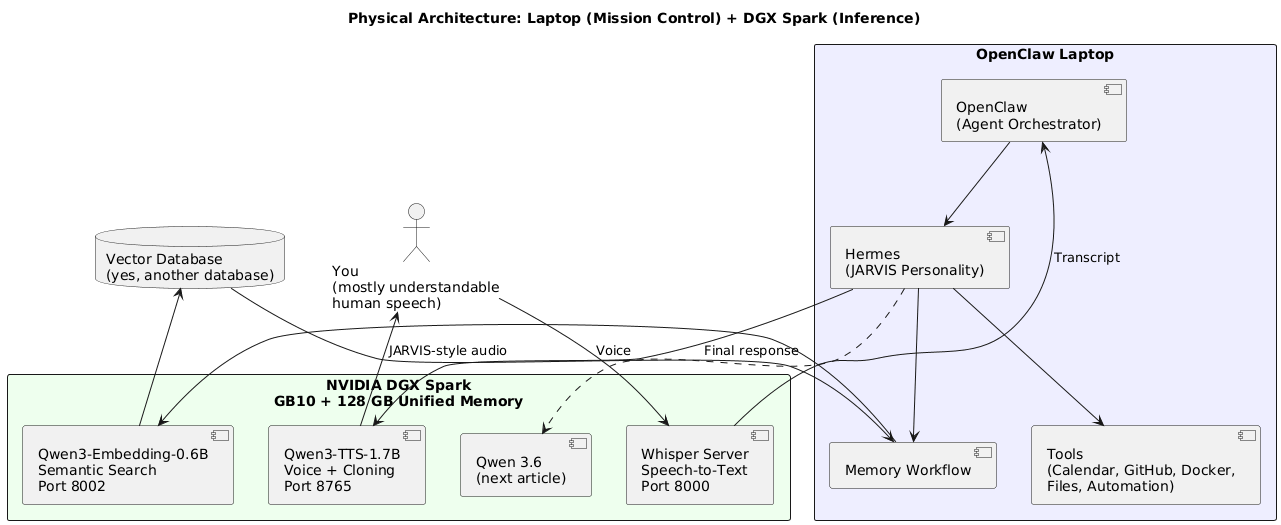
The DGX Spark is not running OpenClaw itself.
That separation is intentional.
The laptop acts as mission control. The DGX Spark behaves more like an internal AI appliance exposing services over the local network.
This provides several benefits:
- OpenClaw can restart without unloading every model.
- The DGX Spark can focus on inference.
- Other machines can reuse the same AI endpoints.
- Each service can be upgraded independently.
- When something breaks, I have more machines to blame.
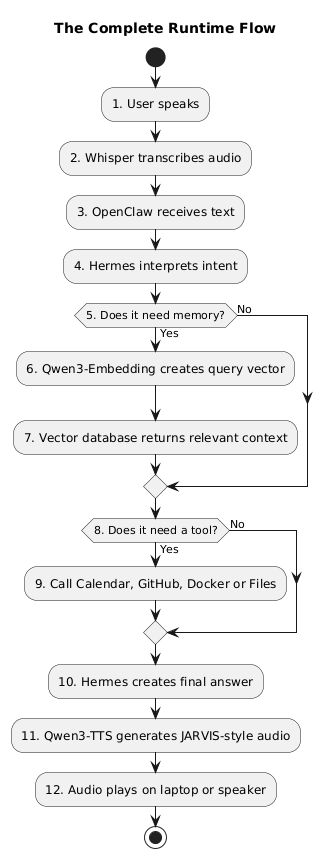
How a Voice Request Moves Through the System
Suppose I say:
“JARVIS, where did I save the Docker Compose file for my Ghost blog?”
The request passes through several specialized components.
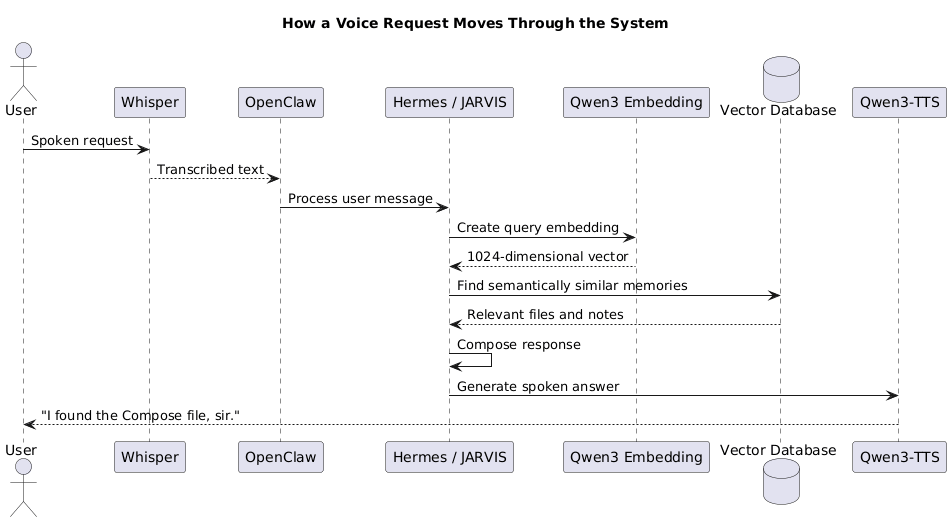
No individual component is JARVIS.
Together, they produce the illusion of one assistant.
It is essentially microservices architecture, except every service has consumed several gigabytes of memory and developed an opinion about CUDA versions.
Meet the AI Department
The system is easier to understand if we treat it like a badly managed company.
| Component | Corporate Role | Actual Job |
|---|---|---|
| Whisper | Receptionist | Converts speech into text |
| Hermes | Executive assistant | Decides what the request means and what should happen |
| OpenClaw | Operations manager | Connects models, tools, memory, and workflows |
| Qwen3-Embedding | Librarian | Converts text into vectors for semantic search |
| Vector database | Archive room | Stores and retrieves vectors |
| Qwen3-TTS | Spokesperson | Converts text into speech |
| Qwen 3.6 | Senior engineer | Performs deeper reasoning and generation |
| DGX Spark | Overworked server | Runs everything until memory runs out |
The DGX Spark Memory Situation
Everything runs co-resident on one NVIDIA GB10 Grace Blackwell system with 128 GB of unified memory.
There is no traditional split between system RAM and dedicated GPU VRAM. The CPU and GPU share the same LPDDR5X memory pool.
Imagine several siblings sharing one car.
Technically, everyone has access to it.
Practically, somebody is going to take it without asking.
This means nvidia-smi does not always give you the complete memory picture.
Use:
free -hThen use nvidia-smi to identify active GPU processes:
nvidia-smi \
  --query-compute-apps=pid,process_name,used_memory \
  --format=csv
My rule is simple:
Trustfree -hfor total memory pressure. Usenvidia-smito identify which model is currently eating the furniture.
If the unified-memory pool is oversubscribed, the machine may not merely slow down gracefully. It can hard-lock with an error similar to:
NVRM: NV_ERR_NO_MEMORYAt that point, your AI assistant stops being JARVIS and becomes a very expensive black rectangle.
Leave headroom.
Step 1: Give JARVIS a Voice with Qwen3-TTS
For speech generation, I use Qwen3-TTS-1.7B.
The service supports two useful model variants.
CustomVoice
The CustomVoice model contains built-in speakers.
It loads when the service starts and consumes approximately 3.9 GB of memory.
Use this when:
- You want predictable built-in voices.
- You do not need voice cloning.
- You want the first request to respond immediately.
Base
The Base model supports voice cloning.
I lazy-load it only when the /clone endpoint is called. This prevents another roughly 4 GB from occupying memory before it is needed.
Use this when:
- You want JARVIS to sound like JARVIS.
- You want to clone your own voice.
- You want your server to answer using your voice, which is either brilliant or the beginning of a very confusing household.
Install Qwen3-TTS
Create a Python virtual environment:
python3 -m venv ~/venvs/qwen3-tts
source ~/venvs/qwen3-tts/bin/activate
Upgrade the packaging tools:
python -m pip install --upgrade pip setuptools wheelInstall Qwen TTS and the CUDA 13-compatible Torchaudio version:
pip install qwen-tts torchaudio==2.10.0 \
  --extra-index-url https://download.pytorch.org/whl/cu130
Pin this exact Torchaudio version.
Do not casually add -U and allow pip to upgrade everything because it feels helpful.
It may install Torchaudio 2.11 alongside Torch 2.10 and produce an error similar to:
undefined symbol: torch_dtype_float4_e2m1fn_x2This message is Python's way of saying:
“You had a working evening planned? That is adorable.”
Check the versions:
python - <<'PY'
import torch
import torchaudio

print("Torch:", torch.__version__)
print("Torchaudio:", torchaudio.__version__)
print("CUDA available:", torch.cuda.is_available())
PY
Configure the TTS Models
Set the paths to your downloaded model repositories:
export QWEN3_TTS_MODEL="/opt/models/Qwen3-TTS-1.7B-CustomVoice"
export QWEN3_TTS_BASE_MODEL="/opt/models/Qwen3-TTS-1.7B-Base"
The CustomVoice model loads at startup.
The Base model should remain lazy-loaded until a cloning request arrives.
This distinction matters because unified memory is shared by every model running on the DGX Spark.
Memory that is not currently occupied by voice cloning can be used by Whisper, embeddings, or the future Qwen 3.6 deployment.
In unified memory, every gigabyte has a job interview.
Expose an OpenAI-Compatible Endpoint
The service exposes:
POST /v1/audio/speechExample request:
curl http://dgx-spark.local:8765/v1/audio/speech \
  -H "Content-Type: application/json" \
  -d '{
    "model": "qwen3-tts",
    "voice": "jarvis",
    "input": "Good evening, sir. Three containers are unhealthy, but I assume that was intentional.",
    "response_format": "wav"
  }' \
  --output jarvis-response.wav
Play the result:
aplay jarvis-response.wavOr, depending on your desktop:
ffplay -nodisp -autoexit jarvis-response.wavStep 2: Clone the JARVIS-Style Voice
Voice cloning requires a short, clean reference recording.
Around 8 to 15 seconds is usually enough.
The sample should contain:
- One speaker
- Minimal background music
- No sound effects
- Clear speech
- Consistent volume
- No other characters shouting about an incoming missile
For my personal setup, I prepared a short JARVIS-style audio reference from media I had access to.
I did not use an entire scene. I isolated a small clean sample and used it only as a private reference clip.
Again, use audio you have permission to use. Do not redistribute copyrighted samples or deploy a cloned voice in a way that impersonates a real person.
Prepare the Reference Clip
Convert the source audio to mono, 24 kHz WAV:
ffmpeg \
  -i source-audio.m4a \
  -ss 00:00:03 \
  -t 8 \
  -ac 1 \
  -ar 24000 \
  -c:a pcm_s16le \
  jarvis-reference.wav
What these options do:
-ss 00:00:03     Start three seconds into the source
-t 8             Extract eight seconds
-ac 1            Convert to mono
-ar 24000        Resample to 24 kHz
-c:a pcm_s16le   Produce uncompressed 16-bit WAV audio
Listen to it before cloning:
ffplay -nodisp -autoexit jarvis-reference.wavThe clip should be clean and understandable.
If the reference contains music, explosions, or Tony Stark talking over it, your cloned voice may sound like JARVIS trapped inside a movie trailer.
Register or Send the Reference Voice
The exact request depends on the wrapper around Qwen3-TTS, but conceptually the clone endpoint receives:
- The voice name
- The reference audio
- The reference transcript
- The text to synthesize
Example:
curl http://dgx-spark.local:8765/clone \
  -F "voice_name=jarvis" \
  -F "reference_text=Good evening, sir. How may I assist you?" \
  -F "audio=@jarvis-reference.wav" \
  -F "text=All systems are operational. Two Docker containers disagree, but that is apparently normal." \
  --output cloned-response.wav
Then play it:
ffplay -nodisp -autoexit cloned-response.wavThe first cloning request is slower because the Base model must be loaded.
After that, subsequent requests are faster because the model remains resident in memory.
Voice Aliases
My service treats any non-built-in speaker name as a possible cloned voice alias.
That means OpenClaw can request:
{
  "voice": "jarvis"
}
The alias maps to the stored reference audio.
You could also use names such as:
hal
alloy
computer
definitely-not-paul-bettany
The API does not care.
Your conscience might.
Step 3: Fake Streaming Because Real Streaming Is Complicated
Qwen3-TTS does not provide true token-level audio streaming in the same way that some cloud services do.
A fully buffered response can take roughly 29 seconds for a longer answer.
That is unacceptable for a conversational assistant.
Nobody wants this interaction:
“JARVIS, what is on my calendar?”
Twenty-nine seconds of silence.
“You have one meeting.”
By then, I have checked the calendar myself, attended the meeting, and forgotten why I built an assistant.
The workaround is sentence-level chunking.
Instead of synthesizing the complete answer at once:
Sentence 1 + Sentence 2 + Sentence 3
                    v
               One large WAV
Split the response:
Sentence 1 -> WAV chunk 1
Sentence 2 -> WAV chunk 2
Sentence 3 -> WAV chunk 3
Send each completed chunk as soon as it becomes available.
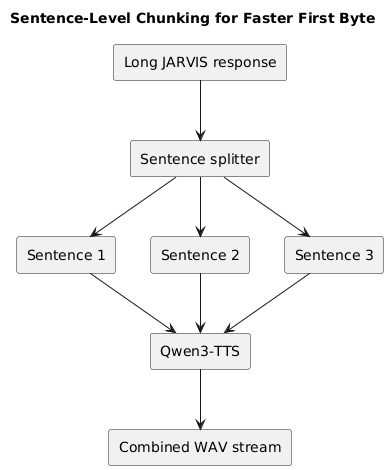
This reduced my time to first byte from approximately 29 seconds to around 2.7 seconds.
It is not true model streaming.
It is architectural dishonesty for a good cause.
Simple Sentence Chunking in Python
import re
from collections.abc import Iterator


def split_sentences(text: str) -> Iterator[str]:
    """
    Splits text into sentence-sized chunks suitable for TTS.

    This is intentionally simple. Production code may need to handle
    abbreviations, URLs, decimals, and people who use punctuation creatively.
    """
    pattern = re.compile(r"(?<=[.!?])\s+")

    for sentence in pattern.split(text.strip()):
        cleaned = sentence.strip()

        if cleaned:
            yield cleaned


if __name__ == "__main__":
    response = (
        "Good evening, sir. Your Ghost container is healthy. "
        "Your database container is restarting. "
        "I assume this is part of your deployment strategy."
    )

    for index, sentence in enumerate(split_sentences(response), start=1):
        print(f"Chunk {index}: {sentence}")
Later, each chunk can be sent individually to /v1/audio/speech.
Step 4: Give JARVIS Ears with Whisper
For speech recognition, I use a Whisper server running in Docker.
Whisper is the pragmatic choice.
It understands accents, background noise, incomplete sentences, and my English after I have been debugging Docker networking for four hours.
That last capability was non-negotiable.
The service runs on port 8000 and consumes approximately 9.6 GB in my configuration.
Whisper Docker Compose
services:
  whisper-server:
    image: your-whisper-server-image:latest
    container_name: whisper-server
    restart: unless-stopped

    ports:
      - "8000:8000"

    volumes:
      - ./models:/models
      - ./cache:/root/.cache

    environment:
      TZ: America/Los_Angeles
      WHISPER_MODEL: large-v3

    deploy:
      resources:
        reservations:
          devices:
            - driver: nvidia
              capabilities:
                - gpu
Start it:
docker compose up -dVerify the container:
docker compose psFollow the logs:
docker compose logs -f whisper-serverTest Speech-to-Text
Record a short test:
arecord \
  -f S16_LE \
  -r 16000 \
  -c 1 \
  -d 5 \
  test-command.wav
Send it to the transcription endpoint:
curl http://dgx-spark.local:8000/v1/audio/transcriptions \
  -F "file=@test-command.wav" \
  -F "model=whisper-1"
Example response:
{
  "text": "Jarvis, check whether my Ghost container is running."
}
If Whisper correctly understands that sentence after hearing my accent through a cheap microphone, I consider the deployment production-ready.
My standards are rigorous.
The Root Process That Looks Suspicious
When you inspect the GPU processes, the Whisper service may appear in nvidia-smi as a Python process owned by root.
At 2 a.m., it looks remarkably similar to a rogue cryptocurrency miner.
It is probably just the Docker container.
Do not immediately run:
sudo kill -9 <pid>I am not saying I did this.
I am saying the documentation should have been clearer.
Step 5: Give JARVIS Semantic Memory
This was the part I initially resisted.
I already know SQL.
I like SQL.
SQL and I understand each other.
I ask:
SELECT *
FROM Memories
WHERE Topic = 'Docker';
SQL gives me rows.
Then someone says:
“You need a vector database.”
And suddenly my perfectly respectable relational database is being judged because it cannot understand that “container deployment file” and “Docker Compose configuration” probably mean the same thing.
Fine.
We are using vectors.
But I am keeping SQL nearby in case things get out of hand.
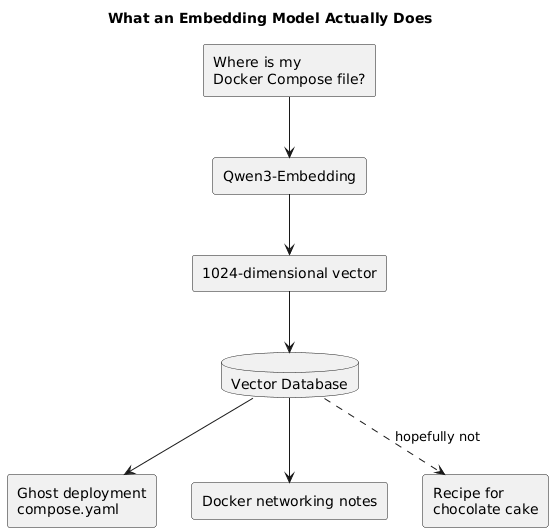
What an Embedding Model Actually Does
An embedding model does not answer questions.
It does not generate text.
It does not reason.
It converts text into a numerical representation called a vector.
For example:
"Where is my Docker Compose file?"becomes something conceptually similar to:
[0.018, -0.221, 0.473, 0.091, ...]With Qwen3-Embedding-0.6B, the complete vector contains 1024 dimensions.
Text with similar meaning produces vectors that are close together mathematically.
That makes it possible to search based on meaning instead of exact keywords.
Why I Replaced EmbeddingGemma
I initially used embeddinggemma-300m.
It worked until a file-search workload exceeded its 2,048-token limit.
Then it fell over.
The file was longer than the embedding model's attention span, which made two of us.
I migrated to Qwen3-Embedding-0.6B because it supports:
- Context lengths up to 32K tokens
- 1024-dimensional vectors
- Better handling of longer documents
- Deployment through vLLM's pooling runner
The service consumes approximately 7 GB in my setup.
Run Qwen3-Embedding with vLLM
Example Docker Compose:
services:
  qwen3-embedding:
    image: vllm/vllm-openai:latest
    container_name: qwen3-embedding
    restart: unless-stopped

    ports:
      - "8002:8000"

    volumes:
      - ./models:/models
      - ./huggingface-cache:/root/.cache/huggingface

    environment:
      TZ: America/Los_Angeles

    command:
      - --model
      - Qwen/Qwen3-Embedding-0.6B
      - --runner
      - pooling
      - --host
      - 0.0.0.0
      - --port
      - "8000"
      - --max-model-len
      - "32768"

    deploy:
      resources:
        reservations:
          devices:
            - driver: nvidia
              capabilities:
                - gpu
Start the service:
docker compose up -dCheck the logs:
docker compose logs -f qwen3-embeddingTest the Embeddings Endpoint
curl http://dgx-spark.local:8002/v1/embeddings \
  -H "Content-Type: application/json" \
  -d '{
    "model": "Qwen/Qwen3-Embedding-0.6B",
    "input": "The Ghost blog Docker Compose file is stored in the homelab deployment folder."
  }'
The response contains a vector:
{
  "data": [
    {
      "embedding": [
        0.018,
        -0.221,
        0.473
      ],
      "index": 0
    }
  ],
  "model": "Qwen/Qwen3-Embedding-0.6B"
}
The real vector contains 1024 values.
I shortened the example because listing all 1024 numbers would technically increase the article length while contributing absolutely nothing to civilization.
The 768-Dimension Compatibility Problem
My previous embedding system used 768-dimensional vectors.
Qwen3-Embedding produces 1024 dimensions.
vLLM's pooling runner does not provide Matryoshka dimension truncation for this model.
Fortunately, Qwen3-Embedding was trained to support Matryoshka-style truncation.
To retain compatibility with an existing 768-dimensional collection, truncate the vector yourself:
from collections.abc import Sequence


def truncate_embedding(
    embedding: Sequence[float],
    dimensions: int = 768,
) -> list[float]:
    """
    Truncates a Matryoshka-compatible embedding.

    Raises an error if the requested dimension is invalid.
    """
    if dimensions <= 0:
        raise ValueError("dimensions must be greater than zero")

    if dimensions > len(embedding):
        raise ValueError(
            f"Cannot truncate a {len(embedding)}-dimension vector "
            f"to {dimensions} dimensions."
        )

    return list(embedding[:dimensions])
Usage:
original_vector = [0.1] * 1024
compatible_vector = truncate_embedding(original_vector, dimensions=768)

print(len(compatible_vector))
Output:
768The service will not hold your hand.
The math will.
Vector Database, Even Though I Already Know SQL
The vector database stores:
- The embedding
- The original text
- Metadata
- File paths
- Timestamps
- Tags
- Document identifiers
A stored record might look like this:
{
  "id": "ghost-compose-note",
  "vector": [0.018, -0.221, 0.473],
  "payload": {
    "text": "The Ghost blog Docker Compose file is stored at /srv/ghost/compose.yaml.",
    "source": "homelab-notes",
    "category": "docker",
    "path": "/srv/ghost/compose.yaml"
  }
}
When I ask JARVIS:
“Where did I put the deployment file for my blog?”
The system:
- Embeds the question.
- Searches for nearby vectors.
- Retrieves the matching note.
- Gives the retrieved context to Hermes.
- Generates a natural response.
- Sends the response to Qwen3-TTS.
SQL could find the record if I knew the exact table, column, category, and wording.
Vector search finds it even when I describe the same idea differently.
I still love SQL.
We are simply seeing other databases now.
Step 6: Connect Everything to OpenClaw
OpenClaw runs on the laptop.
It connects to the services on the DGX Spark through the local network.
Example service configuration:
ai_services:
  speech_to_text:
    provider: openai-compatible
    base_url: http://dgx-spark.local:8000/v1
    model: whisper-1

  text_to_speech:
    provider: openai-compatible
    base_url: http://dgx-spark.local:8765/v1
    model: qwen3-tts
    voice: jarvis

  embeddings:
    provider: openai-compatible
    base_url: http://dgx-spark.local:8002/v1
    model: Qwen/Qwen3-Embedding-0.6B
    dimensions: 1024
The exact OpenClaw syntax may vary depending on the version and integration layer, but the architecture remains the same.
OpenClaw needs three endpoint URLs:
http://dgx-spark.local:8000
http://dgx-spark.local:8002
http://dgx-spark.local:8765
Make sure the laptop can reach them:
curl http://dgx-spark.local:8000/health
curl http://dgx-spark.local:8002/health
curl http://dgx-spark.local:8765/health
A failed request usually means one of four things:
- The service is not running.
- The firewall is blocking the port.
- The hostname does not resolve.
- Docker networking has decided you need more character development.
Open the Ports on the DGX Spark
Using UFW:
sudo ufw allow from 192.168.1.0/24 to any port 8000 proto tcp
sudo ufw allow from 192.168.1.0/24 to any port 8002 proto tcp
sudo ufw allow from 192.168.1.0/24 to any port 8765 proto tcp
Check the rules:
sudo ufw status numberedLimit access to your local subnet rather than exposing these services to the internet.
The world does not need anonymous access to your cloned JARVIS voice.
Run Qwen3-TTS as a User Service
A systemd --user service keeps TTS running independently of the terminal.
Example:
[Unit]
Description=Qwen3 TTS Service
After=network-online.target

[Service]
Type=simple
WorkingDirectory=/opt/qwen3-tts-service
Environment=QWEN3_TTS_MODEL=/opt/models/Qwen3-TTS-1.7B-CustomVoice
Environment=QWEN3_TTS_BASE_MODEL=/opt/models/Qwen3-TTS-1.7B-Base
ExecStart=/home/youruser/venvs/qwen3-tts/bin/python app.py
Restart=always
RestartSec=5

[Install]
WantedBy=default.target
Save it as:
~/.config/systemd/user/qwen3-tts.serviceReload the user services:
systemctl --user daemon-reloadEnable and start it:
systemctl --user enable --now qwen3-tts.serviceCheck its status:
systemctl --user status qwen3-tts.serviceFollow the logs:
journalctl --user -u qwen3-tts.service -fEnable lingering so it continues running after logout:
sudo loginctl enable-linger "$USER"Now JARVIS can continue speaking even when you log out.
This is convenient and mildly unsettling.
The Complete Runtime Flow
How Much Memory Does Everything Use?
Approximate values from my system:
| Service | Approximate Memory |
|---|---|
| Qwen3-TTS CustomVoice | 3.9 GB |
| Qwen3-TTS Base clone model | Additional 4 GB |
| Whisper server | 9.6 GB |
| Qwen3-Embedding-0.6B | 7 GB |
| Operating system and services | Variable |
| Qwen 3.6 | Discussed in the next article |
| My optimism | No measurable limit |
The total is manageable before adding the main LLM.
The challenge starts when Qwen 3.6 joins the party.
That model requires careful decisions about:
- Quantization
- Context length
- KV cache
- Concurrent requests
- Model format
- Available unified memory
- How badly you really need a 128K context window
That is why it gets a separate article.
Pros and Cons of Each Component
Qwen3-TTS
Pros
- Natural-sounding speech
- Built-in voices
- Voice cloning
- Can expose an OpenAI-compatible API
- Runs locally
- Supports sentence-level streaming workarounds
Cons
- Voice-cloning model consumes additional memory
- No true token-level streaming
- Dependency versions require careful pinning
- Bad reference audio produces bad cloned voices
- Makes ordinary server errors sound far too confident
Whisper
Pros
- Strong transcription quality
- Good accent handling
- Mature ecosystem
- Easy to containerize
- OpenAI-compatible servers are widely available
Cons
- Larger models consume significant memory
- Real-time latency depends on model size and audio chunking
- Background noise still matters
- May faithfully transcribe words you regret saying
Qwen3-Embedding
Pros
- 32K context support
- 1024-dimensional vectors
- Strong semantic retrieval
- Works with vLLM pooling
- Matryoshka-compatible truncation
Cons
- Requires vector storage
- Existing collections may need migration
- vLLM does not automatically truncate dimensions
- Forces SQL developers to admit that similarity is useful
Hermes
Pros
- Strong agent and tool-use behavior
- Good fit for the JARVIS personality
- Coordinates memory, tools, and model calls
- Can remain lightweight compared with the main reasoning model
Cons
- Still depends on reliable tool definitions
- Bad prompts create confidently bad plans
- Agent loops require guardrails
- Occasionally needs to be reminded that not every problem requires six tools and a committee
OpenClaw
Pros
- Central orchestration layer
- Connects local models and tools
- Separates inference from agent logic
- Supports reusable workflows
- Makes the entire system feel like one assistant
Cons
- More integrations mean more failure points
- Network services must remain reachable
- Tool schemas need maintenance
- Eventually becomes the thing you troubleshoot instead of the thing helping you troubleshoot
Final Thoughts
The movies made JARVIS look like one impossibly intelligent program.
My version is not one program.
It is a distributed system.
Whisper listens.
Qwen3-Embedding searches memory.
A vector database stores semantic knowledge, despite my ongoing loyalty to SQL.
Hermes behaves as JARVIS.
OpenClaw coordinates everything.
Qwen3-TTS gives it a voice.
The DGX Spark supplies the muscle while my laptop runs mission control.
And soon, Qwen 3.6 will provide the deeper reasoning engine.
The result is not the real JARVIS.
It cannot design an Iron Man suit.
It cannot control a fleet of autonomous robots.
It cannot calculate the structural integrity of Avengers Tower.
But it can search my notes, call my tools, understand my broken English, and tell me—using a very polished British-style voice—that I forgot to start a Docker container.
Honestly, that is close enough for version one.
In the next article, I will add Qwen 3.6 and explain how context length, quantization, KV cache, and unified-memory restrictions determine whether the DGX Spark becomes a reasoning powerhouse or an extremely expensive space heater.
Quien busque camisetas de fútbol por competición puede reducir dudas comprobando la temporada, el diseño y los detalles visibles. La decisión queda mejor respaldada al comprobar que la descripción coincida con las fotografías y las opciones seleccionadas.
Happy Coding!!!