HTTPS POST and PlantUML, your best friend.

Hello!!!
This is going to be a short post, and for once I actually mean it.
I'm currently working on automating the creation of PlantUML diagrams and embedding them directly into Word documents and Excel spreadsheets — yes, that's a real thing people need, yes, it's exactly as tedious as it sounds, and yes, I will be that person's hero, whether they asked for one or not.
Instead of copying a rendered image off the PlantUML server by hand like some kind of caveman dragging a screenshot into PowerPoint at 4:58pm on a Friday, I'll generate the diagram dynamically and grab the image back as a stream — ready to drop straight into a document, an email, wherever it needs to go, with zero human clipboard involved.
Enter the POST verb for the PlantUML server, quietly doing more work than it gets credit for.
If you remember, we already built a self-hosted server in an earlier post — we'll reuse that same server here, because building infrastructure twice is a hobby I don't have time for. I'm using curl below, but Postman, or genuinely any HTTP client you've ever been forced to learn, works exactly the same way.
Point a POST request at your server. In my case:
http://localhost:8082/pngNotice the png at the end — that's the endpoint telling the server which format to hand back, no separate config, no settings menu, just a word in the URL doing all the negotiating.
For the body, we'll reuse the exact sequence diagram from the “Shiny Things” post, because writing a brand new diagram just to prove a point about HTTP verbs felt like overkill even for me:
@startuml

'standard libraries
!include <C4/C4_Container>
!include <azure/AzureCommon>
!include <azure/Databases/AzureSqlServer>
!include <tupadr3/common>
!include <office/Servers/application_server>
!include <office/Concepts/application_generic>

'header
title Stylish Sequence Diagram

'actors and participants
actor "Client" as client
participant "<$application_server>\nIdentity Server Provider" as idp
participant "<$application_generic>\nAPI" as api
participant "<$AzureSqlServer>\nProducts Database" as database

'interactions
autonumber "<b>[000]"

  group Authentication
    client -> idp: Authentication Request
    activate idp
      idp --> client: Authentication Response
    deactivate idp
  end

  group Obtain Products
    client -> api: Get Products
    activate api
      api -> database : Query Products
      activate database
        database --> api : Products
      deactivate database
      api --> client : JSON Products
    deactivate api
  end

'footer
footer v1.0

@enduml
Post that as the raw request body, plain text, no wrapping, no escaping, no ceremony:
curl -X POST --data-binary @diagram.puml -H "Content-Type: text/plain" http://localhost:8082/png -o result.pngAnd... TA-DA:
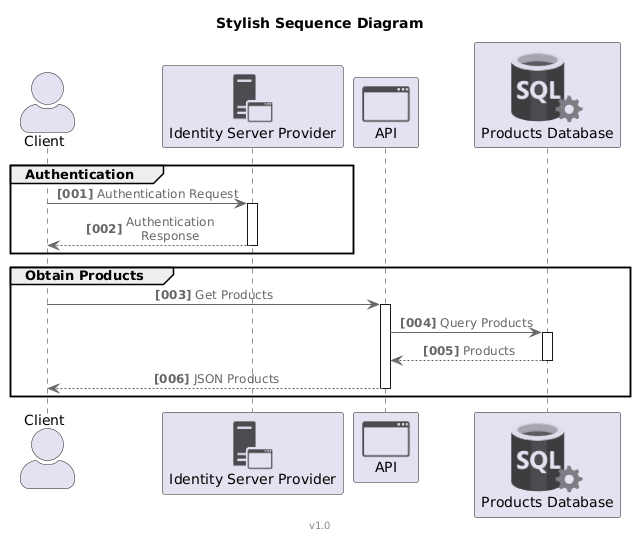
The response is a genuine image/png, delivered like a normal person's API response instead of a magic trick you have to reverse-engineer. Stream it, save it, forward it into a document, pipe it into whatever downstream thing needs a picture — the possibilities open right up once it's just bytes on a wire instead of a browser tab you have to babysit and pray doesn't refresh.
How about other formats? Swap png for svg in the URL, and out comes real vector graphics instead, scaling to infinity without a single pixel complaining:
curl -X POST --data-binary @diagram.puml -H "Content-Type: text/plain" http://localhost:8082/svg -o result.svgOther formats worth knowing about:
pngsvgtxt(ASCII art — genuinely, an actual UML sequence diagram made entirely out of box-drawing characters, like it's 1987 and proud of it)pdf
Yes, txt really does work, and it is delightful in a way I was not emotionally prepared for. Here's a slice of the same diagram, rendered as pure ASCII, no images, no vectors, just character art doing its absolute best:
                                                                 Stylish Sequence Diagram
                       ┌─┐
                       ║"│
                       └┬┘
                       ┌┼┐                 ┌────────────────────────┐           ┌──────────────────────┐           ┌─────────────────┐
                        │                  │<$application_server>   │           │<$application_generic>│           │<$AzureSqlServer>│
                       ┌┴┐                 │Identity Server Provider│           │API                   │           │Products Database│
                     Client                └────────────┬───────────┘           └───────────┬──────────┘           └────────┬────────┘
                        │                               │                                   │                               │
          ╔═════════════╪═══╤═══════════════════════════╪══════════════════════╗            │                               │
          ║ AUTHENTICATION  │                           │                      ║            │                               │
          ╟──────────────[001] Authentication Request  ┌┴┐                     ║            │                               │
          ║             │─────────────────────────────>│ │                     ║            │                               │
          ║             │                              └┬┘                     ║            │                               │
          ║             │[002] Authentication Response  │                      ║            │                               │
          ║             │<─ ─ ─ ─ ─ ─ ─ ─ ─ ─ ─ ─ ─ ─ ─ │                      ║            │                               │
          ╚═════════════╪═══════════════════════════════╪══════════════════════╝            │                               │
Genuinely useful for dropping a diagram straight into a plain-text README, a commit message, or a terminal-only box where images are a fantasy you can't afford — and pdf is exactly as painless, for when you'd rather hand someone a print-ready file instead of making them squint at a monitor.
Pretty cool. Like I said, short post — for once, a promise I'm actually keeping.
Happy coding!!!
Antes de elegir entre camisetas de fútbol para hombre, merece la pena comprobar la comodidad, el tejido y la frecuencia de uso. Como comprobación final, conviene asegurarse de que las imágenes muestren el frontal, la espalda y los acabados relevantes.