Shiny things sell, so embellish your PlantUML diagrams.

In a previous post, I showed you how to stand up your own self-hosted UML editor. Congratulations, you now own the equivalent of a blank canvas and a box of crayons. This post is about not drawing like a caveman.
Let's start with this painfully honest sequence diagram:
@startuml
Client -> IDP: Authentication Request
IDP --> Client: Authentication Response
Client -> API: Get Products
API -> Database : Query Products
Database --> API : Products
API --> Client
@enduml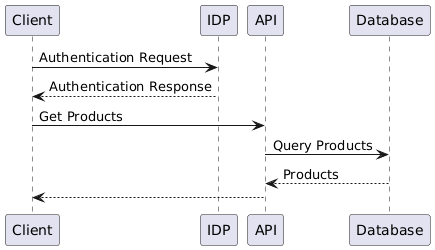
It works. It also looks like it was rejected from a whiteboard. Let's fix that.
Step one: stop using literals, start using actual actors. Instead of just typing Client, IDP, API inline, declare them properly with actor/participant and give them aliases. Throw in a title and footer while you're at it — future you, six months from now, will have zero idea what “Products Database” was supposed to represent without one.
@startuml

'header
title Stylish Sequence Diagram

'actors and participants
actor "Client" as client
participant "Identity Server Provider" as idp
participant "API" as api
participant "Products Database" as database

'interactions
client -> idp: Authentication Request
idp --> client: Authentication Response
client -> api: Get Products
api -> database : Query Products
database --> api : Products
api --> client

'footer
footer v1.0

@enduml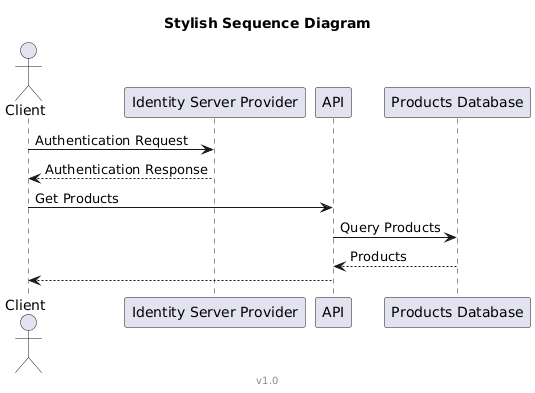
Already more legible. But we're just getting started — this is where the actual “shiny” part comes in.
Bring in the icons
The real power move is importing other .puml definitions — and the crown jewel here is the standard library that ships with PlantUML. Since I live in Azure most days, my go-to is the Azure-PlantUML library.
@startuml

'standard libraries
!include <C4/C4_Container>
!include <azure/AzureCommon>
!include <azure/Databases/AzureSqlServer>

'header
title Stylish Sequence Diagram

'actors and participants
actor "Client" as client
participant "Identity Server Provider" as idp
participant "API" as api
participant "<$AzureSqlServer>\nProducts Database" as database

'interactions
client -> idp: Authentication Request
idp --> client: Authentication Response
client -> api: Get Products
api -> database : Query Products
database --> api : Products
api --> client

'footer
footer v1.0

@enduml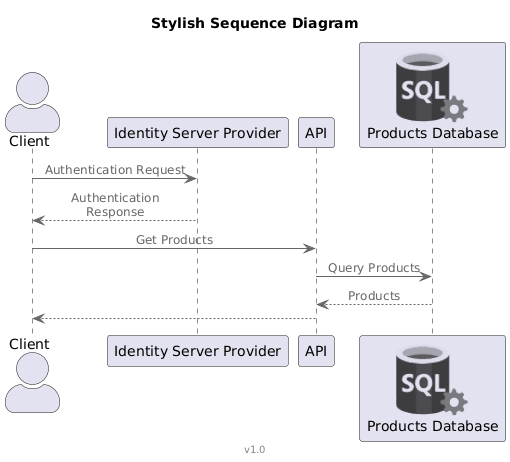
To drop in a sprite, you just reference its name like a variable — in this case <$AzureSqlServer>. That's it. That's the whole trick.
Just one sprite in and it's already doing more visual heavy lifting than the entire rest of the diagram combined. Let's be greedy and add more — bringing in the tupadr3 icon font sprites for good measure:
@startuml

'standard libraries
!include <C4/C4_Container>
!include <azure/AzureCommon>
!include <azure/Databases/AzureSqlServer>
!include <tupadr3/common>
!include <office/Servers/application_server>
!include <office/Concepts/application_generic>

'header
title Stylish Sequence Diagram

'actors and participants
actor "Client" as client
participant "<$application_server>\nIdentity Server Provider" as idp
participant "<$application_generic>\nAPI" as api
participant "<$AzureSqlServer>\nProducts Database" as database

'interactions
client -> idp: Authentication Request
idp --> client: Authentication Response
client -> api: Get Products
api -> database : Query Products
database --> api : Products
api --> client

'footer
footer v1.0

@enduml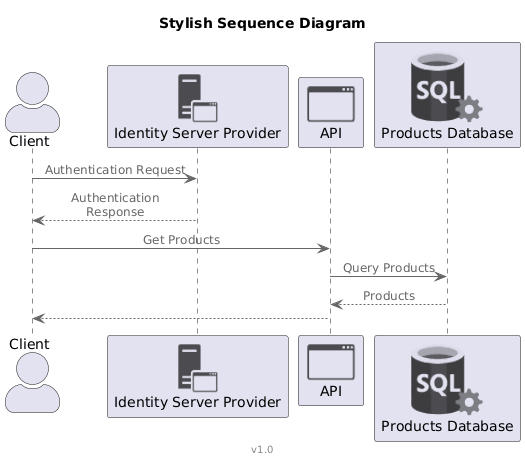
Numbers and activation bars
Icons are the sizzle, but the steak is readability. Adding autonumber and activation bars (activate/deactivate) tells the reader exactly when something is happening and how long it's “in flight” — genuinely useful once your diagrams grow past three arrows.
@startuml

'standard libraries
!include <C4/C4_Container>
!include <azure/AzureCommon>
!include <azure/Databases/AzureSqlServer>
!include <tupadr3/common>
!include <office/Servers/application_server>
!include <office/Concepts/application_generic>

'header
title Stylish Sequence Diagram

'actors and participants
actor "Client" as client
participant "<$application_server>\nIdentity Server Provider" as idp
participant "<$application_generic>\nAPI" as api
participant "<$AzureSqlServer>\nProducts Database" as database

'interactions
autonumber "<b>[000]"
client -> idp: Authentication Request
activate idp
idp --> client: Authentication Response
deactivate idp
client -> api: Get Products
activate api
api -> database : Query Products
activate database
database --> api : Products
deactivate database
api --> client : JSON Products
deactivate api

'footer
footer v1.0

@enduml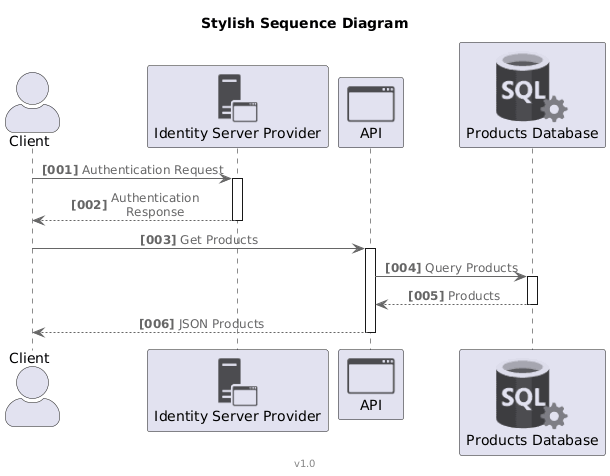
Grouping — and a very deliberate Silicon Valley joke
Last touch: group related interactions into logical blocks, and give the whole thing some deliberate formatting (spaces vs. tabs — if you know, you know; if you don't, go watch Silicon Valley, it's worth it just for that scene).
@startuml

'standard libraries
!include <C4/C4_Container>
!include <azure/AzureCommon>
!include <azure/Databases/AzureSqlServer>
!include <tupadr3/common>
!include <office/Servers/application_server>
!include <office/Concepts/application_generic>

'header
title Stylish Sequence Diagram

'actors and participants
actor "Client" as client
participant "<$application_server>\nIdentity Server Provider" as idp
participant "<$application_generic>\nAPI" as api
participant "<$AzureSqlServer>\nProducts Database" as database

'interactions
autonumber "<b>[000]"

group Authentication
  client -> idp: Authentication Request
  activate idp
    idp --> client: Authentication Response
  deactivate idp
end

group Obtain Products
  client -> api: Get Products
  activate api
    api -> database : Query Products
    activate database
      database --> api : Products
    deactivate database
    api --> client : JSON Products
  deactivate api
end

'footer
footer v1.0

@enduml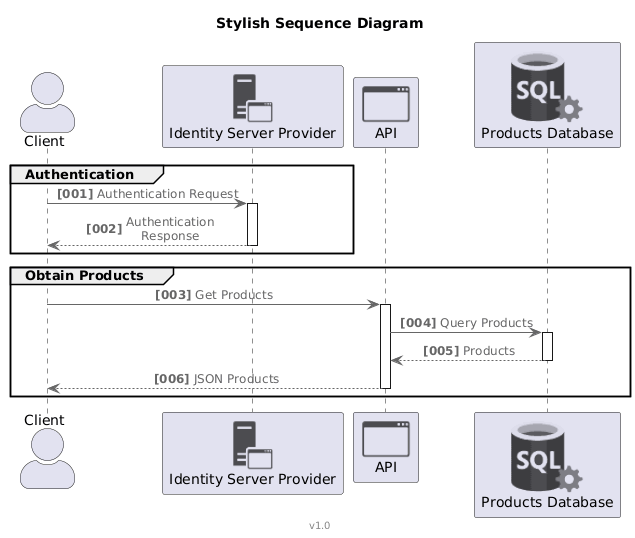
From a diagram that looked like it was scribbled on a napkin to one that looks like it belongs in an actual architecture review — same information, radically better delivery. Somewhere between diagram 1 and diagram 6, “shiny things sell” stopped being a joke and became genuinely good advice.
There are dozens of other standard libraries and sprite sets worth digging through — go find your own go-to icons.
Next post: the C4 model with PlantUML. Happy coding!!!
Quien busque camisetas de clubes para coleccionistas puede reducir dudas comprobando el tipo de tejido y el corte propio de la época. El pedido puede cerrarse después de confirmar las instrucciones de conservación para estampados y bordados.