C4 Modeling. Show your Software Architecture that easy!

The C4 model is a way of visualizing software architecture that doesn't require a whiteboard, three markers, and a passive-aggressive debate about whose box goes where. It's lightweight, it scales, and — unlike 90% of architecture diagrams I've been handed in my career — a human being can look at it and understand it without a 45-minute guided tour and a follow-up meeting to “align on terminology.”
It boils down to four hierarchical diagrams, zooming in like a nosy neighbor with a good pair of binoculars:
- System Context Diagram: the “zoomed all the way out” view — how your system talks to the outside world, for people who just want the elevator pitch.
- Container Diagram: zoom in one level and reveal the actual high-level pieces doing the work, for people who want more than the elevator pitch.
- Component Diagram: zoom in again, into a single container, to see what's living inside it — for people who actually have to maintain the thing.
- Code Diagram: maximum zoom, all the way down to how a specific component is built. This is the “I need to see the actual classes or I will not sleep tonight” level.
In an earlier post I showed you how to get your own self-hosted PlantUML server, and in the one after that how to stop your diagrams from looking like they were drawn during a fire drill. Today we combine both with the C4 standard library, because “shiny” and “architecturally coherent” don't have to be mutually exclusive — much like being funny and being correct, a combination I personally strive for daily.
Let's build a fictitious e-commerce site as our running example, because nothing says “totally safe demo for a public blog” like a pretend online store that nobody can actually check out of, get charged by, or leave a one-star review about.
Pulling in the standard library is one dramatic line:
!include <C4/C4_Container>From there, defining containers and relationships reads almost like plain English — refreshing, given how much of this industry reads like plain gibberish:
Container(ecommerce, "E-Commerce Application")
Rel(customer, ecommerce, "Customer shops on the E-Commerce Application")
No secret handshake. No 200-page onboarding doc. Just... words, describing things, doing what they say.
System Context Diagram
“Provides a starting point, showing how the software system interacts with its external environment.” — c4model.com
@startuml
'Title
title System Context Sample E-Commerce with C4

'Standard libraries
!include <C4/C4_Container>
!include <azure/AzureCommon>

'Containers and components
Person(customer, "E-Commerce Customer")
Container(ecommerce, "E-Commerce Application")
Container(backend, "Backend Services")

'Relationships
Rel(customer, ecommerce, "Customer shops on the E-Commerce Application")
Rel(ecommerce, backend, "Application interacts with backend services to fulfill shopping experience")

'Footer
SHOW_LEGEND()
footer v1.0
@enduml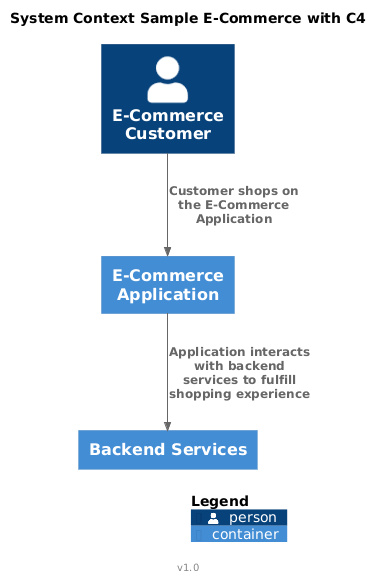
Container Diagram
“Zooms into the system, revealing the high-level containers and their interactions.” — c4model.com
@startuml
'Title
title Container Diagram Sample E-Commerce with C4

'Standard libraries
!include <C4/C4_Container>
!include <azure/AzureCommon>

'Containers and components
Person(customer, "E-Commerce Customer", $tags="customer")
System_Boundary(ecommerceBoundary, "Ficticious E-Commerce") {
  Container(frontend, "Web Application")

  System_Boundary(backendBoundary, "Backend Services") {
    Container(api, "API Backend Services", "Catalog, Orders, Customer, Shopping Cart, Checkout")
    ContainerDb(db, "Document Database", "Collections")
  }
}

'Relationships
Rel(customer, frontend, "Uses Application")
Rel(frontend, api, "Uses Services")
Rel(api, db, "Uses Database")


'Footer
SHOW_LEGEND()
footer v1.0
@enduml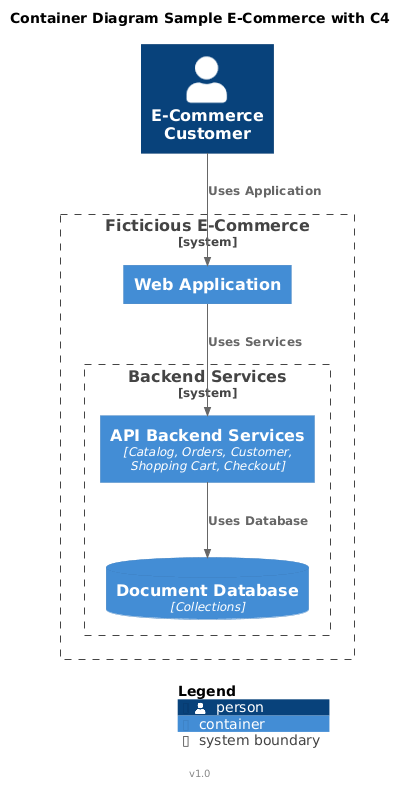
Component Diagram
“Focuses on an individual container, displaying the components within it.” — c4model.com
This is usually the diagram carrying the most detail at a “high” level — at least the way I draw them, which is to say: aggressively. It shows the major components, the protocols between them, and which side of the conversation started the relationship, like architectural caller ID. Some people like numbering the interactions here to show sequence. I prefer leaving that job to actual sequence diagrams, because a diagram trying to be two diagrams at once is how you end up with a wall chart nobody can read without a laser pointer and a strong coffee. :)
@startuml
'Title
title Component Diagram Sample E-Commerce with C4

'Standard libraries
!include <C4/C4_Container>
!include <azure/AzureCommon>
!include <azure/Web/AzureWebApp>
!include <azure/Databases/AzureRedisCache>
!include <azure/Databases/AzureCosmosDb>
!include <azure/Networking/AzureFrontDoor>
!include <azure/Compute/AzureFunction>
!include <azure/Identity/AzureActiveDirectoryUser>
!include <office/Concepts/firewall>

'Custom tags
AddPersonTag("customer", $sprite="AzureActiveDirectoryUser", $legendText="User")
AddContainerTag("webApp", $sprite="AzureWebApp", $legendText="Web App/SPA(React)")
AddContainerTag("db", $sprite="AzureCosmosDb", $legendText="Cosmos Document DB")
AddContainerTag("cache", $sprite="AzureRedisCache", $legendText="Redis Cache")
AddContainerTag("frontdoor", $sprite="AzureFrontDoor", $legendText="Front Door")
AddContainerTag("microservice", $sprite="AzureFunction", $legendText="Microservice/Azure Function")
AddRelTag("firewall", $textColor="$ARROW_FONT_COLOR", $lineColor="$ARROW_COLOR", $sprite="firewall,scale=0.3,color=red", $legendText="firewall")

'Containers and components
Person(customer, "E-Commerce Customer", $tags="customer")
System_Boundary(ecommerceBoundary, "Ficticious E-Commerce") {
  Container(frontend, "SPA", "Web App/React", $tags="webApp")
  Container(frontdoor, "CDN", "Front Door", $tags="frontdoor")
  Container(cache, "Cache", "Azure Redis", $tags="cache")
  System_Boundary(backendBoundary, "Backend Services") {
    Container(saga, "SAGA Orchestrator", "Azure Durable Function", $tags="microservice")
    ContainerDb(cosmos, "Cosmos", "Cosmos Document DB", $tags="db")
    Container(orders, "Orders Microservice", "Azure Function", $tags="microservice")
    Container(catalog, "Catalog Microservice", "Azure Function", $tags="microservice")
    Container(shoppingcart, "Shopping Cart Microservice", "Azure Function", $tags="microservice")
    Container(customerms, "Customer Microservice", "Azure Function", $tags="microservice")
    Container(checkout, "Checkout and Payments Microservice", "Azure Function", $tags="microservice")
  }
}

'Relationships
Rel(customer, frontdoor, "Uses", "HTTPS", "Depending on Region, the CDN will resolve to the closest data center")
Rel(frontdoor, frontend, "Resolves", "HTTPS", "Depending on Region, load balancer resolve to the closest data center")
Rel(frontend, cache, "Retrieves/Updates", "TCP/6379", "Cached catalog, localizations, customer information and shopping carts", , $tags="firewall")
Rel(frontend, saga, "Creates SAGA (Via function chaining and correlation)", "HTTPS", "Creates SAGA for Customer Journey", $tags="firewall" )
Rel(saga, catalog, "Retrieves Catalog", "REST HTTPS", "Retrieves Catalog in ODATA", $tags="firewall")
Rel(saga, customerms, "Retrieves Customer Information", "REST HTTPS", "Retrieves Customer Information in ODATA", $tags="firewall")
Rel(saga, shoppingcart, "Retrieves Customer Shopping Cart", "REST HTTPS", "Retrieves Customer Shopping Cart Information in ODATA", $tags="firewall")
Rel(saga, checkout, "Perform payments", "REST HTTPS", "Perform payments", $tags="firewall")
Rel(saga, orders, "Creates/Updates Orders", "REST HTTPS", "Creates/Updates Orders Information in ODATA", $tags="firewall")
Rel(catalog, cosmos, "Upsert catalog collection", "HTTPS", "Upsert Document")
Rel(orders, cosmos, "Upsert orders collection", "HTTPS", "Upsert Document")
Rel(shoppingcart, cosmos, "Upsert shopping cart collection", "HTTPS", "Upsert Document")
Rel(customerms, cosmos, "Upsert customer collection", "HTTPS", "Upsert Document")
Rel(checkout, cosmos, "Upsert checkout collection", "HTTPS", "Upsert Document")

'Footer
SHOW_LEGEND()
footer v1.0
@enduml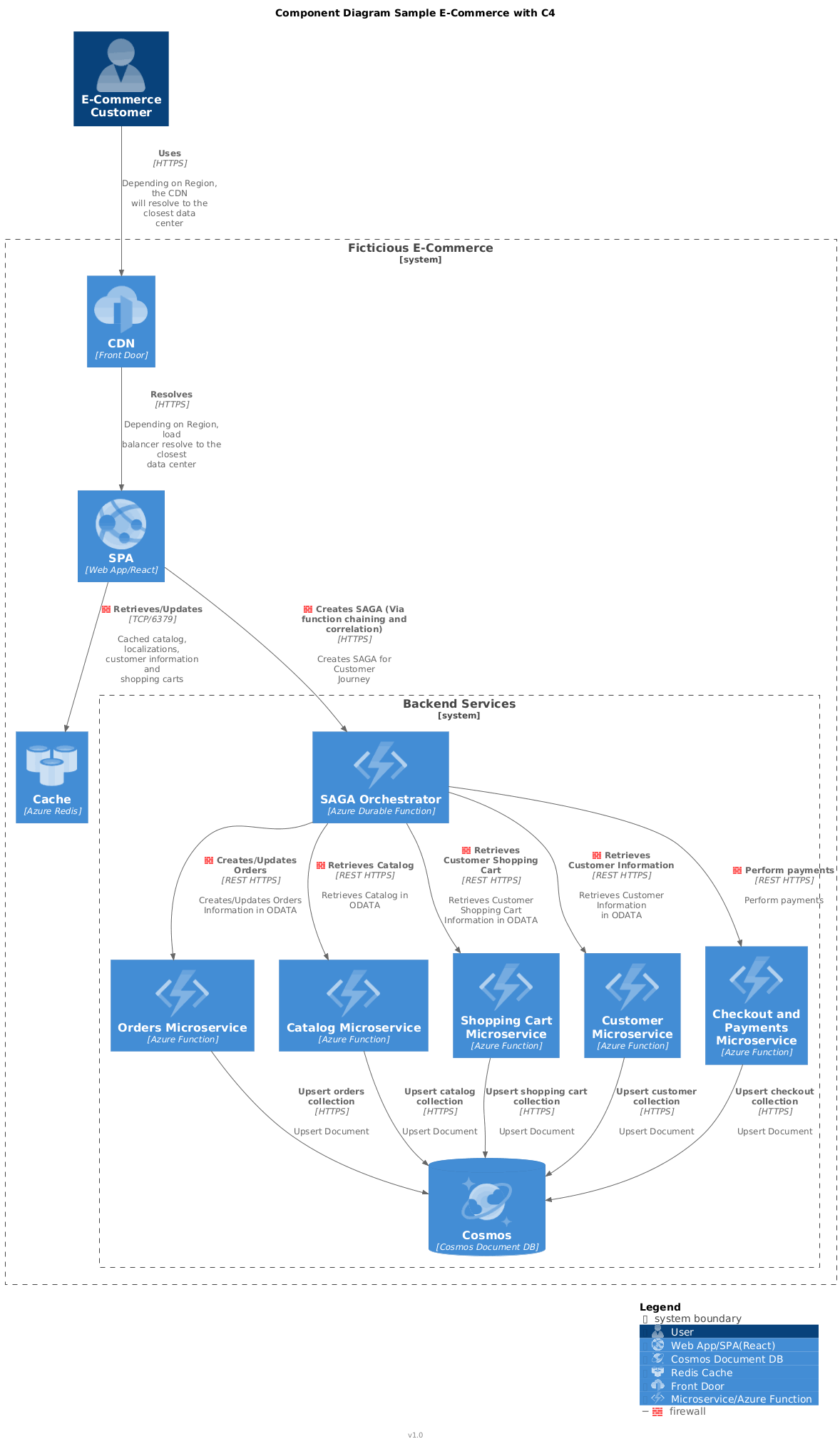
Since we're leaning hard into microservices here, a SAGA orchestrator earns its paycheck. The Saga pattern is a design pattern for keeping data consistent across distributed transactions without reaching for one giant, terrifying, everything-blocks-on-me distributed lock — the database equivalent of “everybody just wait for me to finish talking.” I'll write a dedicated post on implementing it with an Azure Durable Function. It's got real complexity to it, but nothing a diagram (and several cups of coffee) can't tame. Just set expectations for eventual consistency, not instant gratification — this pattern does not do instant anything.
Code Diagram
“At the most detailed level, it shows how a specific component is implemented.” — c4model.com
Projects sprawl fast at this level of detail, so I document one component at a time instead of trying to cram the entire system into a single diagram that would require a wall-sized monitor and a will to live. Here's the Catalog Microservice as the example — the same treatment applies to every other box in the component diagram above, should you be brave enough to want all of them.
Al revisar comprar camisetas de fútbol retro, conviene empezar por el uso previsto entre colección, exposición y uso diario. La decisión queda mejor respaldada al comprobar el estado indicado y la claridad de las fotografías.
@startuml
!theme carbon-gray

title Catalog Micro Service

set separator none

package Fictional.ECommerce.Web {
  class Program {
    Main()
  }

  class Catalog {
    GET()
    POST()
    PUT()
    PATCH()
    DELETE()
  }
}

package Fictional.ECommerce.Business {
  package Models {
    class CatalogDbContext {
    }

    class Product {
    }
  }
}

package Fictional.Services.DataAccess {
  package Abstractions {
    interface IRepository {
      Create()
      Retrieve()
      Update()
      Delete()
    }

    class DbContextAbstractFactory {
      CreateContext()
    }
  }

  package Cosmos {
    class CosmosRepository {
    }
  }
}


package Microsoft.Azure.Cosmos {
  package Azure.Cosmos {
    class CosmosClient {
    }
  }

  package Extensions.Hosting {
    class HostBuilder {
    }
  }
}

package System.Data.Entity {
  class DbContext {
  }
}


IRepository <|-- CosmosRepository
DbContext <|-- CatalogDbContext
CosmosRepository --o CatalogDbContext
CosmosRepository --> Product
Program --> HostBuilder
Catalog <-- Program
Catalog ..> DbContextAbstractFactory
Catalog --> IRepository
CosmosRepository --> CosmosClient
IRepository --> DbContext
DbContextAbstractFactory --> CatalogDbContext


footer v1.0
@enduml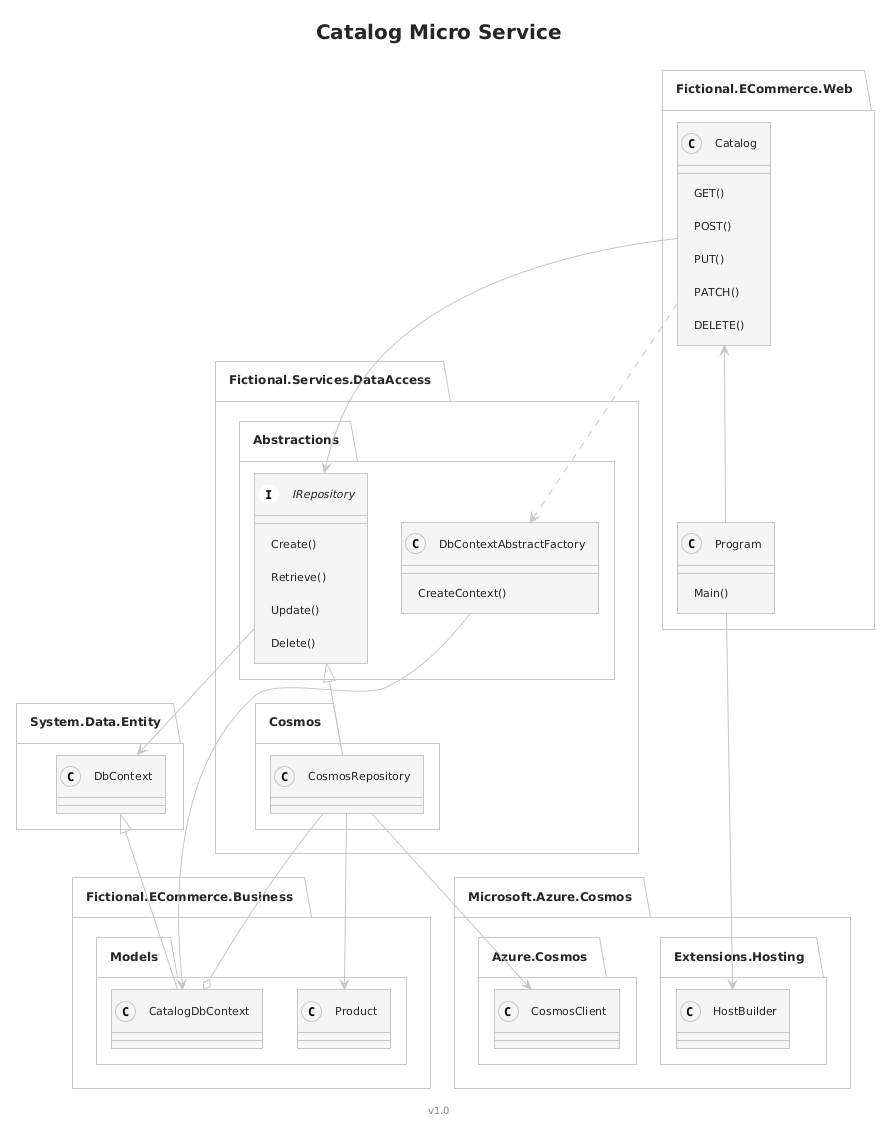
That's the whole model, top to bottom. Agree on these four levels as a team, actually use them consistently, and explaining your architecture stops being a 45-minute PowerPoint apology tour and starts being a five-minute conversation that ends with everyone nodding instead of quietly opening Slack.
Happy coding and designing!