
OData! Oh my!! So powerful indeed!!!

Welcome back — today we're talking about one of my favorite technologies, and yes, I do have favorites, I'm not made of stone. OData!! You have no idea how many hours this standard has saved me, and how many circular API-design arguments it's ended before they even started, purely by virtue of being a standard instead of yet another developer's personal opinion wearing a REST costume.
What is OData?
“The Open Data Protocol (OData) is a data access protocol built on core protocols like HTTP and commonly accepted methodologies like REST for the web” — odata.org
In plain terms: you query your model straight from the URL — selecting fields, paging, ordering, filtering — without hand-rolling a bespoke query parameter scheme for every endpoint like it's a personality trait you're proud of. I first ran into OData years ago querying Azure Table Storage, and I've been quietly, smugly grateful ever since. (Remind me to write about the repository pattern I use across multiple storage providers — that's a post of its own, and it's been “coming soon” for embarrassingly long.)
This is going to be a lengthy post, but not so lengthy I need to split it — that's what part two is for, and yes, there will be a part two, I already promised it once at the bottom of this post and I intend to keep that promise eventually. As always, the full sample code is on GitHub: jtenoriodseldon/OData.
Let's begin.
Setting up the Database
We're using Microsoft's sample AdventureWorksLT database — it has enough real data to be interesting and enough relationships between tables to matter later in this post (customers, addresses, orders, the works), instead of the usual three fake rows everybody's tutorial database seems to ship with.
Restore it locally on SQL Express, or spin it up in Docker — the Docker route needs a bit more setup, but it's genuinely the correct call if you're writing unit or integration tests, which, again, you should be, I will not stop saying this.
Once restored, generate the model with EF Core Power Tools — point it at the reverse-engineering wizard, and it scaffolds the entity classes and DbContext for you via T4 templates, sparing you the deeply unpleasant experience of hand-writing forty POCOs from a database diagram at 11pm.
Model out of the way, on to the actual API — the part you're actually here for.
Solution
Here's the shape of the project:
ODataAPI/
├── Controllers/
│   └── CustomersController.cs
├── DTOs/
│   ├── ODataCustomError.cs
│   ├── ODataEnvelope.cs
│   ├── ODataResultEnvelopeCollection.cs
│   └── ODataResultEnvelopeProjection.cs
├── Filter/
│   └── ODATAParamsFilter.cs
├── Models/
│   └── (EF Core scaffolded entities — Customer, Address, Product, etc.)
├── Results/
│   └── ODataCustomResult.cs
├── Settings/
│   └── ODataSettings.cs
├── Program.cs
├── appsettings.json
└── ODataAPI.http
Settings
A small settings class holds the defaults for our custom OData result:
public class ODataSettings
{
    public required string HostName { get; set; }
    public bool IsHttps { get; set; }
    public int MaxPageSize { get; set; } = 2500;
    public int DefaultPageSize { get; set; } = 250;
}HostName— the host used when buildingnextUrlfor pagination.IsHttps— self-explanatory, no twist ending, sorry.MaxPageSize— the hard ceiling on how much a caller can request in one greedy gulp.DefaultPageSize— what you get if a caller doesn't specify$topand just wants... some data, please, any amount.
appsettings.json
"ConnectionStrings": {
  "DefaultConnection": "Data Source=(localdb)\\MSSQLLocalDB;Initial Catalog=AdventureWorksLT2019;Integrated Security=True;Connect Timeout=30;"
},
"ODataSettings": {
  "HostName": "localhost",
  "IsHttps": true,
  "MaxPageSize": 200,
  "DefaultPageSize": 100
}
Open API
We're skipping the traditional OData XML metadata document entirely and leaning on the OpenAPI/Swagger spec instead — nobody, anywhere, has ever wanted to read $metadata XML for fun, and if you have, we need to talk. Since Swagger has zero built-in concept of OData query parameters, here's an operation filter that bolts them on manually:
public class ODATAParamsFilter : IOperationFilter
{
    private static readonly List<OpenApiParameter> ODataOpenAPIParameters = (new List<(string Name, string Description)>()
        {
            ( "$top", "The max number of records to return."),
            ( "$skip", "The number of records to skip."),
            ( "$filter", "A function that must evaluate to true for a record to be returned."),
            ( "$select", "Specifies a subset of properties to return."),
            ( "$orderby", "Determines which values are used to order a collection of records."),
            ( "$expand", "Use to add related query data.")
        }).Select(pair => new OpenApiParameter
        {
            Name = pair.Name,
            Required = false,
            Schema = new OpenApiSchema { Type = "String" },
            In = ParameterLocation.Query,
            Description = pair.Description,
            AllowReserved = true
        }).ToList();

    public void Apply(OpenApiOperation operation, OperationFilterContext context)
    {
        try
        {
            if (context.ApiDescription.ParameterDescriptions[0].ModelMetadata.ModelType.Name.Contains("ODataQueryOptions", StringComparison.InvariantCultureIgnoreCase))
            {
                operation.Parameters ??= [];
                foreach (var item in ODataOpenAPIParameters)
                    operation.Parameters.Add(item);
            }
        }
        catch (Exception)
        {
            //ignore and continue
        }
    }
}
Only fires when the action's first parameter is an ODataQueryOptions — which will click once we get to the controller and you see how little else there is to it.
Program.cs
Now for the fun part — wiring everything together into one glorious startup file:
using Microsoft.AspNetCore.OData;
using Microsoft.AspNetCore.OData.NewtonsoftJson;
using Microsoft.EntityFrameworkCore;
using ODataAPI.Filter;
using ODataAPI.Models;
using ODataAPI.Settings;
using System.Reflection;

var builder = WebApplication.CreateBuilder(args);
var connectionString = builder.Configuration.GetConnectionString("DefaultConnection");
var odataSettings = builder.Configuration.GetSection("ODataSettings").Get<ODataSettings>()!;

builder.Services.AddDbContext<AdventureWorksLT2019Context>(options => options.UseSqlServer(connectionString));
builder.Services.AddSingleton(odataSettings);
builder.Services.AddMvc(options => options.EnableEndpointRouting = false);
builder.Services.AddControllers()
    .AddOData(options => options.Select().Filter().OrderBy().Expand().Count());
builder.Services
    .AddControllers()
   .AddNewtonsoftJson(options =>
   {
       options.SerializerSettings.Formatting = Newtonsoft.Json.Formatting.None;
       options.SerializerSettings.NullValueHandling = Newtonsoft.Json.NullValueHandling.Ignore;
       options.SerializerSettings.MissingMemberHandling = Newtonsoft.Json.MissingMemberHandling.Ignore;
       options.SerializerSettings.DateTimeZoneHandling = Newtonsoft.Json.DateTimeZoneHandling.Local;
       options.SerializerSettings.ContractResolver = new Newtonsoft.Json.Serialization.CamelCasePropertyNamesContractResolver();
       options.SerializerSettings.ReferenceLoopHandling = Newtonsoft.Json.ReferenceLoopHandling.Ignore;
   })
   .AddODataNewtonsoftJson();

builder.Services.AddEndpointsApiExplorer();
builder.Services.AddSwaggerGen(c =>
{
    c.IncludeXmlComments(Path.Combine(AppContext.BaseDirectory, $"{Assembly.GetExecutingAssembly().GetName().Name}.xml"));
    c.OperationFilter<ODATAParamsFilter>();
});

var app = builder.Build();

app.UseRouting();
app.UseSwagger();
app.UseSwaggerUI();
app.UseAuthorization();
app.MapControllers();
await app.RunAsync();
AddOData(...).Select().Filter().OrderBy().Expand().Count() is the one line doing all the heavy lifting — leave a single one of those off the chain and that operator just quietly, politely, stops working. No error. No warning. Just vibes and confusion, an hour later, when you're wondering why $expand won't expand.
Custom MVC OData Executor and Result
Onto the DTOs. First, the ones that are boring entirely on purpose:
public class ODataCustomError
{
    public string? ErrorMessage { get; set; }
}

public class ODataEnvelope
{
    public int Count { get; set; }
    public int PageSize { get; set; }
    public int TotalPages { get; set; }
    public int CurrentPage { get; set; }
    public string? NextUrl { get; set; }
}

public class ODataResultEnvelopeCollection<T>
{
    public List<T>? Results { get; set; }
    public ODataEnvelope? Envelope { get; set; }
}

public class ODataResultEnvelopeProjection
{
    public IQueryable? Results { get; set; }
    public ODataEnvelope? Envelope { get; set; }
}
ODataResultEnvelopeProjection exists specifically for $select — a partial-property projection isn't your original entity type anymore, it's some anonymous shape-shifting cousin of it, so it needs an IQueryable instead of a strongly-typed List<T> pretending everything is fine.
Executor/Result — and a real bug fix, live from the field
This is the actual core of the whole project: ODataCustomResult.ObtainResult() takes the query options, the queryable data, and the settings, and hands back a properly paginated, enveloped result. Everything above this was just scaffolding to get here.
Full disclosure: I didn't just polish the prose on this one. I pulled the real repo, restored a real AdventureWorksLT database, and ran this against a live SQL Server while writing the post — partly to get accurate output for the rewrite, mostly because you told me some readers reported it “sometimes doesn't work,” and “sometimes doesn't work” is a phrase that should terrify every engineer who's ever shipped anything. So I went and found it.
Here's the original logic deciding whether to force a full count:
// Add the count context and use the alternate options, have to do this to inject into the ODataQueryOptions pipeline
if (options.Count == null)
    options.Request.QueryString = options.Request.QueryString.Add("$count", "true");
This only forces $count=true when the caller left $count off entirely. If a caller explicitly sends $count=false — extremely normal, plenty of OData client libraries default to exactly that for performance — this check shrugs and does nothing, and the count logic downstream quietly falls back to counting only the current page's rows, then reports that number as the grand total with a completely straight face.
I reproduced it directly against 847 real customer rows: $count=false&$top=3 came back with an envelope claiming "count": 3, "totalPages": 1 — as if the entire customer database were three people. Any client trusting that envelope to drive pagination would stop dead after page one and never learn the other 844 rows exist, forever, silently, with zero errors thrown anywhere. That's the worst kind of bug — not a crash, just confident, well-formatted, extremely wrong data.
The fix: force $count=true whenever the caller's value is either missing or explicitly false, and properly strip any pre-existing $count parameter before re-adding one, because blindly appending a second $count value onto the query string just creates a small civil war inside the request:
// Add the count context and use the alternate options, have to do this to inject into the ODataQueryOptions pipeline
// Force $count=true regardless of what the caller sent: if we don't override an explicit $count=false,
// the count-of-the-page fallback below silently reports the page size as the grand total.
if (options.Count == null || options.Count.Value == false)
{
    var queryWithoutCount = QueryHelpers.ParseQuery(options.Request.QueryString.Value)
        .Where(kv => !string.Equals(kv.Key, "$count", StringComparison.OrdinalIgnoreCase))
        .SelectMany(kv => kv.Value, (kv, value) => new KeyValuePair<string, string?>(kv.Key, value))
        .ToList();

    queryWithoutCount.Add(new KeyValuePair<string, string?>("$count", "true"));

    options.Request.QueryString = QueryString.Create(queryWithoutCount!);
}
I verified this the boring, correct way: before the fix, $count=false&$top=3 reported count: 3. After the fix, the exact same request correctly reports count: 847. Then, because fixing one thing and quietly breaking three others is a time-honored tradition, I re-ran every other query type — $top, $filter, $orderby, $select, $expand, and every combination I could think of — and all of them still return exactly right. No trade-off, just a fix, the rarest and most satisfying kind.
Here's the flow this method follows end to end:
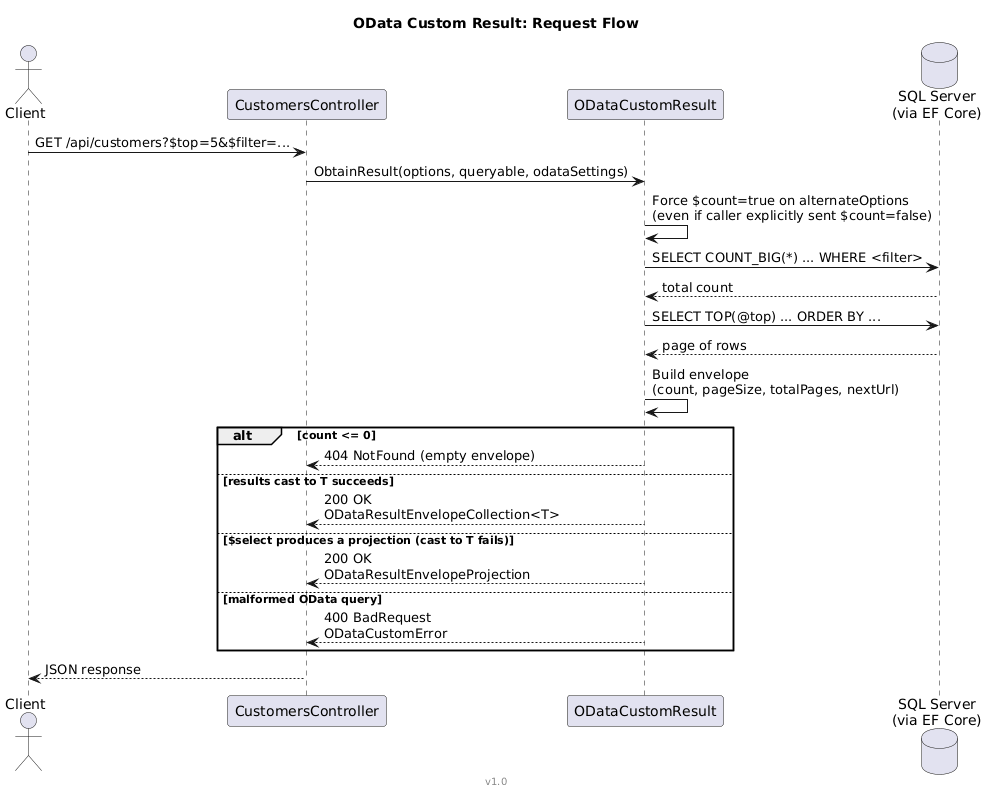
The rest of the method handles pagination math (skip, currentPage, totalPages, nextUrl), and gracefully degrades if the initial count attempt fails — falling back through casting to T, then IEnumerable, then, in the absolute worst case, a full JSON round-trip just to count items. It's defensive to the point of mild paranoia, but it's the specific flavor of paranoia that keeps a public API from face-planting into a 500 on an edge case nobody thought to test.
One more quiet fix while I was in there: the original code checked options.Top.Value < 1 inside a block that had already confirmed alternateOptions.Top != null — a small copy-paste leftover that should reference alternateOptions.Top.Value instead. Fixed it too. It wouldn't have caused the actual headline bug above (both should stay in sync in normal use), but leaving mismatched variable names sitting next to each other in the same method is how future bugs are born, quietly, in the dark.
Full corrected file is on GitHub. Here's the shape, for reference:
public static class ODataCustomResult
{
    public static IActionResult ObtainResult<T>(ODataQueryOptions<T> options, IQueryable queryable, ODataSettings odataSettings)
    {
        // ... count-forcing fix above, then:
        // 1. Force $count=true and rebuild alternateOptions from the mutated request
        // 2. Count entities (with or without $filter applied)
        // 3. Apply $top / default page size, execute the query
        // 4. If count is still unknown, fall back through T -> IEnumerable -> JSON round-trip
        // 5. Calculate skip / currentPage / totalPages / nextUrl
        // 6. Return 404 (empty), 200 (typed or projected), or 400 (bad query) accordingly
    }
}
Customers Controller, Entity Framework and IQueryable
We've been passing IQueryable around this entire post — worth a quick word on why, since I've now used it forty times without explaining myself. In short: deferred query execution. Nothing actually touches the database until the query gets enumerated. Every .Where(), .OrderBy(), .Select() we chain gets mashed together by EF Core into one final SQL statement at the very last moment, instead of firing off a separate round-trip per LINQ call like some kind of database-abuse enthusiast.
The controller itself is refreshingly, almost suspiciously small:
[ApiController]
[ApiExplorerSettings(IgnoreApi = false)]
public class CustomersController : ODataController
{
    private readonly ILogger<CustomersController> _logger;
    private readonly AdventureWorksLT2019Context _dbContext;
    private readonly ODataSettings _odataSettings;

    public CustomersController(ILogger<CustomersController> logger, AdventureWorksLT2019Context dbContext, ODataSettings oDataSettings)
    {
        _logger = logger;
        _dbContext = dbContext;
        _odataSettings = oDataSettings;
    }

    [HttpGet]
    [Route("api/customers")]
    [Produces("application/json")]
    [ProducesResponseType(typeof(ODataResultEnvelopeCollection<Customer>), Status200OK)]
    [ProducesResponseType(typeof(ODataEnvelope), Status404NotFound)]
    [ProducesResponseType(typeof(ODataCustomError), Status400BadRequest)]
    public IActionResult RetrieveAll([SwaggerIgnore] ODataQueryOptions<Customer> options)
    {
        return ODataCustomResult.ObtainResult(options, _dbContext.Customers.AsQueryable(), _odataSettings);
    }
}
That's genuinely the whole controller. All the actual thinking — counting, paging, error handling, existential dread — lives in ODataCustomResult, which is exactly the point: the controller shouldn't need to know or care how any of that sausage gets made.
That was a lot of explanation. We have, at long last, reached the testing phase, and I promise it's more satisfying than the setup.
Testing it for real
Running the project opens Swagger UI, and since the controller's fully decorated with response-type attributes, it renders cleanly — OData parameters included, courtesy of that operation filter earning its keep from earlier.
I ran these live against a real, restored AdventureWorksLT database, because at this point in the post you've earned real output, not a decade-old screenshot I'm asking you to trust:
$ curl "http://localhost:5211/api/customers?$top=5"Returns 5 customers plus an envelope: count: 847, pageSize: 5, totalPages: 170, currentPage: 1, and a working nextUrl pointing straight at the next page, no assembly required.
Checking what EF Core actually whispered to SQL Server for a combined filter/select/orderby request — the exact same example from the original post, preserved for continuity:
GET /api/customers?$filter=firstName eq 'Orlando'&$select=customerId,firstName,lastName&$orderby=lastNameReal, captured SQL, not a mockup:
SELECT COUNT_BIG(*)
FROM [SalesLT].[Customer] AS [c]
WHERE [c].[FirstName] = @__TypedProperty_0

SELECT TOP(@__TypedProperty_2) [c].[CustomerID], [c].[FirstName], [c].[LastName]
FROM [SalesLT].[Customer] AS [c]
WHERE [c].[FirstName] = @__TypedProperty_0
ORDER BY [c].[LastName], [c].[CustomerID]
And the real response:
{
  "results": [
    {"customerId": 1, "firstName": "Orlando", "lastName": "Gee"},
    {"customerId": 29773, "firstName": "Orlando", "lastName": "Gee"}
  ],
  "envelope": {"count": 2, "pageSize": 100, "totalPages": 1, "currentPage": 1}
}
Two Orlando Gees. Same first name, same last name, same email address, two entirely different customer IDs. I promise, cross my heart, that this is genuinely how Microsoft's own sample data ships — not a bug I introduced, not a testing artifact, just AdventureWorksLT quietly having main-character energy about a guy named Orlando Gee for reasons known only to whoever seeded that database twenty years ago.
HTTP file
The project ships an .http file with all five query types loaded and ready to fire:
@ODataAPI_HostAddress = https://localhost:7113

### TOP
GET {{ODataAPI_HostAddress}}/api/customers?$top=5
Accept: application/json

### Filter
GET {{ODataAPI_HostAddress}}/api/customers?$top=5&$filter=firstName%20eq%20'Orlando'
Accept: application/json

### Order By
GET {{ODataAPI_HostAddress}}/api/customers?$orderby=lastName
Accept: application/json

### Select
GET {{ODataAPI_HostAddress}}/api/customers?$select=customerId,firstName,lastName
Accept: application/json

### Expand
GET {{ODataAPI_HostAddress}}/api/customers?$expand=customerAddresses&$filter=customerAddresses/any(i:i%20ne%20null)&$top=5
Accept: application/json
In the next post, we'll dig into the rest of the OData endpoints and some more advanced queries — and this time I mean it, I have notes and everything.
Happy coding!!!