
Duende (Identity Server), Certificates and Postman. What could go wrong? Signed JWT Requests the "easy" way. Part 03

Welcome to the finale of this series — a little Azure, a little architecture, and finally, some actual C#. I'm doing this one backwards: Azure Key Vault setup first, then Visual Studio, then the library in action, then the architecture, and only at the very end, the code walkthrough. If you just want to see it work, that order gets you there fastest.
Azure Key Vault
We're hosting our certificate in Azure this time. Spin up a Key Vault — don't panic about the bill, it runs about 15 cents a month, which is less than most vending machine snacks for the privilege of not hardcoding secrets like an animal.
Once it's created, head to the Certificates section and either generate a new self-signed certificate, or upload the same one you've been using since the Certificate Reader post — reusing it is fine, and honestly recommended, since keeping track of which cert is “the real one” across five different posts is a special kind of chaos.
Next, grant yourself access — either an access policy scoped to specific actions, or the Key Vault Administrator role via RBAC, which is functionally the same idea with a fancier hat. If you're reusing the certificate from Duende setup, you're already set; if not, just update the Base64 public cert in that config with the new one.
Visual Studio Setup
Under Tools → Options, search for “Azure Service Authentication” and sign in with your Azure credentials. This quietly mints a token Visual Studio uses to reach Azure resources on your behalf — genuinely one of the more painless auth experiences Microsoft has shipped.
GitHub
The full source for this post lives at IdentityServerClient on GitHub. Clone it, and there's exactly one unit test waiting for you — though naturally, you'll need to configure it first before it'll do anything but complain.
You'll find three main settings sections:
- InMemoryCacheSettings — self-explanatory: we cache the certificate in memory so we're not making an expensive round trip to the cloud every single time.
- AzureKeyVaultSettings — since the cert lives in Azure, this section has everything needed to fetch it, and references
InMemoryCacheSettings. - IdpServerClientSettings — your Duende (or any IDP) connection info, which in turn references
AzureKeyVaultSettings.
Now wait a minute (yes, that's a Moana reference — have young kids, and this happens to you too eventually) — the settings file ships almost empty on purpose. We fill in the real values via user secrets, so nothing sensitive ends up committed to source control. I'm looking at you, every company that's ever accidentally published a credentials file to a public repo.
Right-click the unit test project, Manage User Secrets, and drop in:
{
  "AzureKeyVaultSettings:AzureKeyVaultUri": "https://yourkeyvault.vault.azure.net/",
  "IdpServerClientSettings:AuthorizationServer": "https://yourduendeidp.madeup",
  "IdpServerClientSettings:ClientId": "jwt.signed.requests",
  "IdpServerClientSettings:Audience": "https://yourduendeidp.madeup",
  "IdpServerClientSettings:KeyVaultCertificateName": "youruploadedcertname",
  "IdpServerClientSettings:Scope": "api.readonly"
}
Swap in your own URLs, client ID, cert name, and scope to match your setup, then debug the unit test. If everything's wired up correctly, you'll get back a real signed JWT and a bearer token — success, and proof the whole three-part fever dream actually works end to end.
You could package this library up as a NuGet package at this point — see my earlier post on publishing NuGet packages via GitHub Actions for that part (still owe you a dedicated post on building the package itself — noted, again).
Architecture
The IdentityServerClient class is the facade — the one thing calling code actually talks to. Underneath it leans on three interfaces: ICache, IKeyVault, and ISettings.
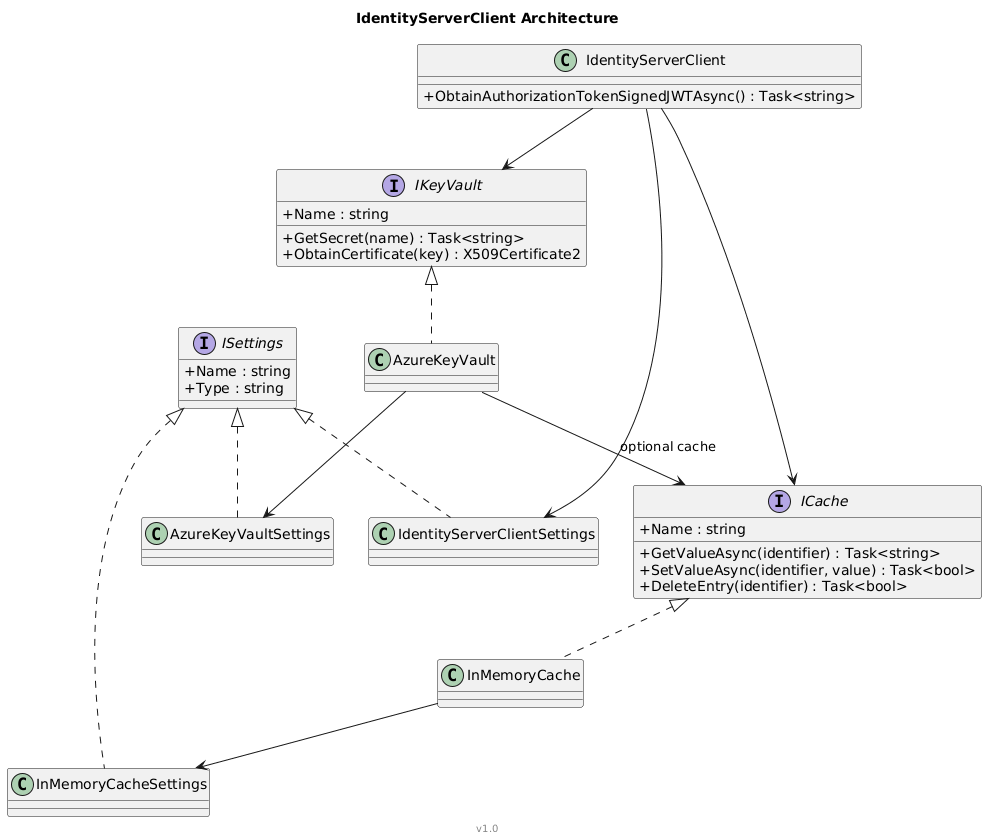
- ICache — today it's just
InMemoryCache, but the interface exists so Redis (or whatever's next) can slot in later without touching calling code. - IKeyVault — today it's Azure. Tomorrow it could be a local cert store, a Java keystore, AWS Secrets Manager, whatever the situation demands.
- ISettings — mostly just carries a
Name, used for dependency injection to pick the right cache or key vault implementation by name when there's more than one registered. There's a bit of a “here's a trick I use everywhere” story behind that pattern — saving it for its own post.
Each concrete implementation gets its own settings section. And since “it works in .NET Core” doesn't always mean “it works in .NET Framework too” (yes, that combination still happens, more than anyone would like), the settings-loading approach is intentionally pluggable — JSON config here, but swap in the Options pattern, or even a homemade XML reader for legacy Framework code, without touching the interfaces themselves.
Caching in memory
The ICache interface is deliberately boring: get, set, delete, check-if-exists.
public interface ICache
{
    string Name { get; }
    Task<bool> DeleteEntry(string identifier);
    Task<string> GetValueAsync(string identifier);
    Task<T> GetValueAsync<T>(string identifier);
    Task<bool> SetValueAsync(string identifier, string valueToStore);
    Task<bool> SetValueAsync(string identifier, string valueToStore, TimeSpan expiration);
    Task<bool> DoesIdentifierExists(string identifier);
}
InMemoryCache implements it on top of a small generic Memory<T> helper built around MemoryCache plus a ConcurrentDictionary of semaphores — so concurrent requests for the same missing key don't all stampede off to fetch it simultaneously. One thread fetches, everyone else politely waits their turn.
Azure Key Vault, in C#
IKeyVault mirrors the same “boring on purpose” philosophy: get a secret, set a secret, get a certificate.
AzureKeyVault implements it, and picks its authentication style based on how you've configured it:
if (_settings.IsManagedServiceIdentity)
{
    if (_settings.IsUseVisualStudioIdentity)
        _client = new SecretClient(new Uri(_settings.AzureKeyVaultUri), new VisualStudioCredential());
    else
        _client = new SecretClient(new Uri(_settings.AzureKeyVaultUri), new DefaultAzureCredential());
}
else
{
    _clientSecretCredential = new ClientSecretCredential(_settings.TenantId, _settings.ClientId, _settings.ClientSecret);
    _client = new SecretClient(new Uri(_settings.AzureKeyVaultUri), _clientSecretCredential);
}
We're sticking with Visual Studio credentials for this walkthrough, though managed identity or good old client ID/secret both work if you're deployed elsewhere.
GetSecret layers caching on top: check the cache first, and only fall back to a real Key Vault round-trip (then repopulate the cache) on a miss:
if (!_settings.IsUseCache)
{
    var result = await _client.GetSecretAsync(name);
    return result.Value.Value;
}

try
{
    return await _cache.GetValueAsync(name);
}
catch
{
    var result = await _client.GetSecretAsync(name);
    await _cache.SetValueAsync(name, result.Value.Value);
    return result.Value.Value;
}
Signing the JWT
This is the part that actually ties everything together.
Before the code, worth naming the actual NuGet packages doing the work here, since none of this compiles without them:
jose-jwt-signed— supplies theBase64Urlencode/decode helpers used to build the JWT's three segments. We're not using its higher-level JWT-building API, just the encoding primitives — the header/claims/signature assembly is done by hand below.Microsoft.IdentityModel.Protocols.OpenIdConnect— pulled in forMicrosoft.IdentityModel.Tokens.EpochTime, which converts .NETDateTimevalues into the Unix timestamps JWTs expect foriatandexp.Newtonsoft.Json— serializes the header and claims objects to JSON before they get encoded.Azure.Identity— provides the credential types (DefaultAzureCredential,VisualStudioCredential,ClientSecretCredential) used back inAzureKeyVaultto authenticate against Key Vault.Azure.Security.KeyVault.CertificatesandAzure.Security.KeyVault.Secrets— the actual Key Vault SDK clients used to fetch the certificate and its secrets.
JwtBearerTokenUtility.GetSignedJwtAsync() builds the same three JWT pieces from Part 02 — header and claims — and base64url-encodes each one using jose-jwt-signed's Base64Url helper:
var jwtClaimset = new JwtClaimset
{
    iss = _settings.ClientId,
    sub = _settings.ClientId,
    jti = Guid.NewGuid().ToString(),
    aud = _settings.Audience
};

var header = new { alg = _settings.JWTSigningAlgo };
var headerEncoded = EncodeData(JsonConvert.SerializeObject(header));

claimset.iat = EpochTime.GetIntDate(DateTime.Now);
claimset.exp = EpochTime.GetIntDate(DateTime.Now.AddMinutes(_settings.JWTExpireInMinutes));
var claimsetEncoded = EncodeData(JsonConvert.SerializeObject(claimset));

var dataToSign = $"{headerEncoded}.{claimsetEncoded}";
var dataToSignBytes = new ASCIIEncoding().GetBytes(dataToSign);
Same jti-per-request trick as the Postman version — a fresh GUID every call, so nobody can replay a captured request.
Then it fetches the actual certificate through IKeyVault — not a file sitting on disk, since avoiding exactly that was the whole point of this series:
var keyVault = _keyVaults.FirstOrDefault(kv => string.Equals(kv.Name, _settings.KeyVaultSettingsName, StringComparison.CurrentCultureIgnoreCase));
var cert = await keyVault.ObtainCertificateAsync(_settings.KeyVaultCertificateName);

var privateKey = cert.GetRSAPrivateKey();
var publicKey = cert.GetRSAPublicKey();

var signedData = privateKey.SignData(dataToSignBytes, HashAlgorithmName.SHA512, RSASignaturePadding.Pkcs1);
var jwtSignature = Base64Url.Encode(signedData);

var sigIsValid = publicKey.VerifyData(dataToSignBytes, signedData, HashAlgorithmName.SHA512, RSASignaturePadding.Pkcs1);

return $"{headerEncoded}.{claimsetEncoded}.{jwtSignature}";
That VerifyData call right after signing isn't required — it's a quick trust-but-verify sanity check against yourself before this thing ever goes out over the wire. Cheap insurance against a bad key silently ruining your day.
Back in IdentityServerClient.ObtainAuthorizationTokenSignedJWTAsync(), obtaining the actual client_assertion is two lines — spin up the utility, ask it for the signed JWT — and then it drops straight into the same form fields Postman was hand-assembling in Part 02:
var utility = new JwtBearerTokenUtility(_settings, _caches, _keyVaults);
var signedJwt = await utility.GetSignedJwtAsync();

var tokenRequest = new HttpRequestMessage(HttpMethod.Post, $"{_settings.AuthorizationServer}{_settings.SuffixTokenEndpoint}");
tokenRequest.Content = new FormUrlEncodedContent(new[]
{
    new KeyValuePair<string, string>("grant_type", "client_credentials"),
    new KeyValuePair<string, string>("client_id", _settings.ClientId),
    new KeyValuePair<string, string>("client_assertion_type", _settings.ClientAssertionType),
    new KeyValuePair<string, string>("client_assertion", signedJwt),
    new KeyValuePair<string, string>("scope", _settings.Scope)
});

var responseMessage = await client.SendAsync(tokenRequest);
Parse the response and you get back a proper AuthorizationToken — access token, expiry, token type. No client secret anywhere, the certificate never leaves Key Vault, and Postman's no longer in the picture at all. Part 02's pre-request script and this method are doing the exact same job — build header, build claims, sign, POST — one's just living in a Postman sandbox and the other ships in your app.
Configuring the Client
Full list of what IdentityServerClientSettings actually exposes, since the user-secrets snippet earlier only touched the essentials:
AuthorizationServer— sameidpServervalue from Part 02, no default, required.SuffixTokenEndpoint— defaults to/connect/token, appended ontoAuthorizationServerto build the full token URL. Only override this if your IDP's token endpoint lives somewhere unusual.ClientId— required, matches whatever client you configured in Duende.ClientSecret— exists on the settings class for completeness/legacy support, but we're not using it here — the entire point of this series was avoiding a plain secret.Scope— optional, same as Part 02.Audience— required, matches your token endpoint URL.ClientAssertionType— defaults tourn:ietf:params:oauth:client-assertion-type:jwt-bearerautomatically. You basically never need to touch this.JWTExpireInMinutes— defaults to 5. How long the signed assertion itself is valid for, not the resulting access token.JWTSigningAlgo— defaults to RS512.KeyVaultCertificateName— the name of the cert as stored in Key Vault.KeyVaultSettingsName— matches theNameyou gave yourAzureKeyVaultSettingsinstance. This is thatISettings.Namedependency-injection trick from earlier finally paying off — it's howJwtBearerTokenUtilitypicks the rightIKeyVaultout of a list of possibly several.
That JWTSigningAlgo default is worth stopping on: RS512, not RS256. Part 02's Postman collection explicitly used RS256. If you configured Duende (or whatever IDP you're using) to only accept RS256-signed assertions, and then run this library with defaults, your token request will fail signature validation — not because anything is broken, but because the two halves of this series are quietly using different algorithms. Either set JWTSigningAlgo = "RS256" here to match Part 02, or configure your IDP to accept RS512. Just pick one and be consistent — the actual signing code doesn't care which, but your IDP absolutely will.
One more small thing: ObtainAuthorizationTokenSignedJWTAsync() returns an AuthorizationToken — just AccessToken, ExpiresInDateTime, and TokenType. Nothing fancy, just enough to know what you have and when it expires.
Unit testing and dependency injection
The test constructor wires up a small ServiceCollection, reads configuration (including that slightly unhinged “walk up four parent directories to find the root” trick — don't judge, it works), and registers each interface with its concrete implementation:
services.AddSingleton<ICache, InMemoryCache>(c => new InMemoryCache(
    _configuration.GetSection("InMemoryCacheSettings").Get<InMemoryCacheSettings>()));

services.AddScoped<IKeyVault, AzureKeyVault>(c => new AzureKeyVault(
    _configuration.GetSection("AzureKeyVaultSettings").Get<AzureKeyVaultSettings>(),
    c.GetServices<ICache>()));

services.AddScoped(c => new IdentityServerClient(
    _configuration.GetSection("IdpServerClientSettings").Get<IdentityServerClientSettings>(),
    c.GetServices<ICache>(),
    c.GetServices<IKeyVault>()));
And the test itself is refreshingly anticlimactic:
[Fact]
public async Task TestSetSecret()
{
    var client = _serviceProvider.GetService<IdentityServerClient>();
    var result = await client.ObtainAuthorizationTokenSignedJWTAsync();
    Assert.True(true);
}
Dependency injection does the actual heavy lifting — note the code asks for IEnumerable<ICache> (plural Services, not Service), because the day there are two cache implementations registered at once, you'll want to pick the right one by name instead of just grabbing whichever one DI feels like handing you.
And that's the whole series: a self-hosted IDP, Postman signing its own tokens, and now a proper C# library doing the same thing your app can actually ship with. Happy coding!!!